|
This is unreleased documentation for SUSE® Virtualization v1.9 (Dev). |
VPC NAT Gateway
|
kubeovn-operator is currently classified as experimental. While the add-on is undergoing further integration, many Kube-OVN networking features have reached general availability (GA) in SUSE Virtualization v1.9. For more information, see Feature Maturity. |
Kube-OVN supports network address translation (NAT) via Kubernetes custom resource definitions (CRDs), not just IP tables directly. For example, resources such as OvnEip, OvnSnatRule, and OvnDnatRule (or their iptables-based equivalents) are used to define NAT behavior declaratively.
In SUSE Virtualization, virtual machine orchestration (compute, storage, virtual machine lifecycle, L2 VLAN-based networking, and underlay networking) is handled by SUSE Virtualization. Overlay networking (including routing, NAT, subnets, and VPC) is handled by Kube-OVN. This separation allows for more scalable, flexible, and clean networking.
NAT provides the following benefits:
-
External connectivity or inbound access
-
Source NAT (SNAT) allows virtual machines and pods in a private overlay network or VPC to access external networks (for example, the internet) by translating their internal source IP to a public (or external network-shared) IP.
-
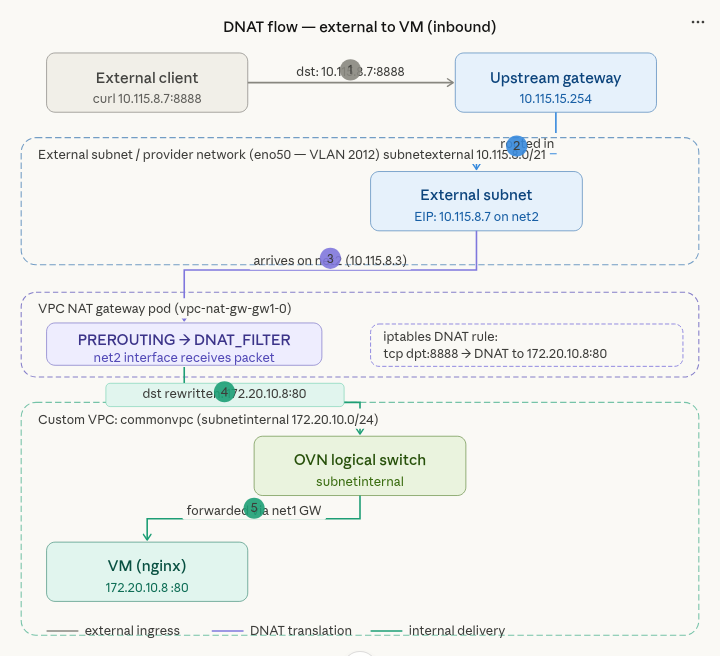
Destination NAT (DNAT) allows external hosts to access internal virtual machines and pods by mapping a public IP or port to an internal private IP or port. This is useful when you want to access an internal virtual machine via SSH.
-
-
Flexible networking for VPCs and overlay networks
When using SNAT or DNAT with Kube-OVN, you can build isolated private subnets and VPCs while still allowing controlled egress (outbound) or ingress (inbound) traffic. This is especially relevant for virtual machine workloads managed by SUSE Virtualization, which may require virtual machines to access the internet or to expose services externally.
Kube-OVN as secondary CNI
In SUSE Virtualization v1.6.x and v1.7.x, outbound and inbound connectivity for virtual machines works only when they are attached to subnets created on a default VPC (ovn-cluster) with the natOutgoing setting set to true.
With the introduction of Kube-OVN as the secondary CNI in SUSE Virtualization v1.8.0, outbound and inbound connectivity for virtual machines also works on subnets created on custom VPCs using the VPC NAT gateway functionality.
Creating a tenant network
-
Create an overlay network (for example,
vswitchinternal). -
Create a custom VPC (for example,
commonvpc). -
Create a subnet inside the VPC created in the previous step (for example,
subnetinternal).When creating a subnet for a tenant network, ensure DHCP is enabled,
dns_serveris set to a valid DNS server IP address (for example,8.8.8.8), andnatOutgoingis set totrue. This configuration ensures that a default route is installed and DNS is resolved on virtual machines attached to these subnets.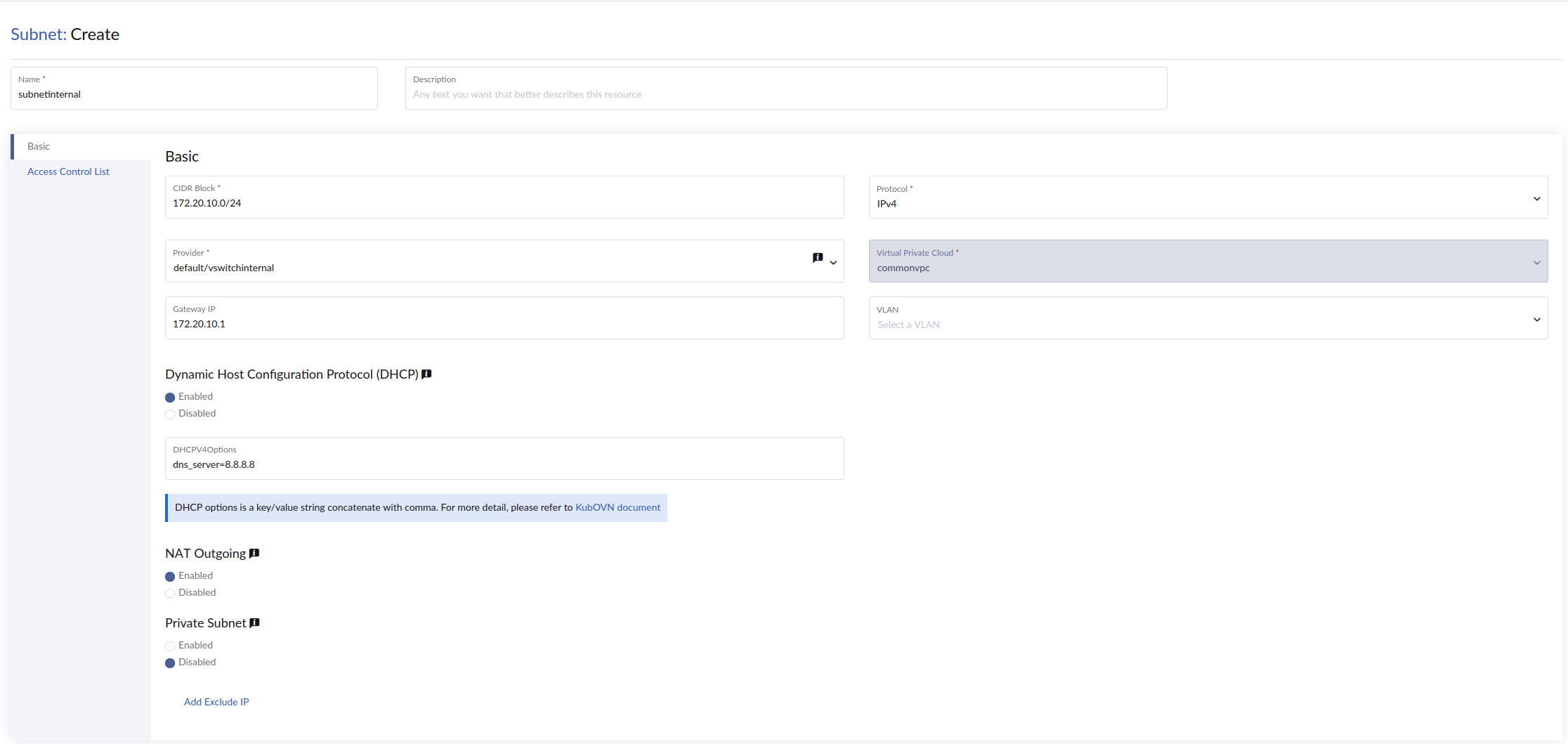
Creating an external network
Follow the instructions in Underlay Configuration to create an external network.
Creating a VPC NAT gateway
-
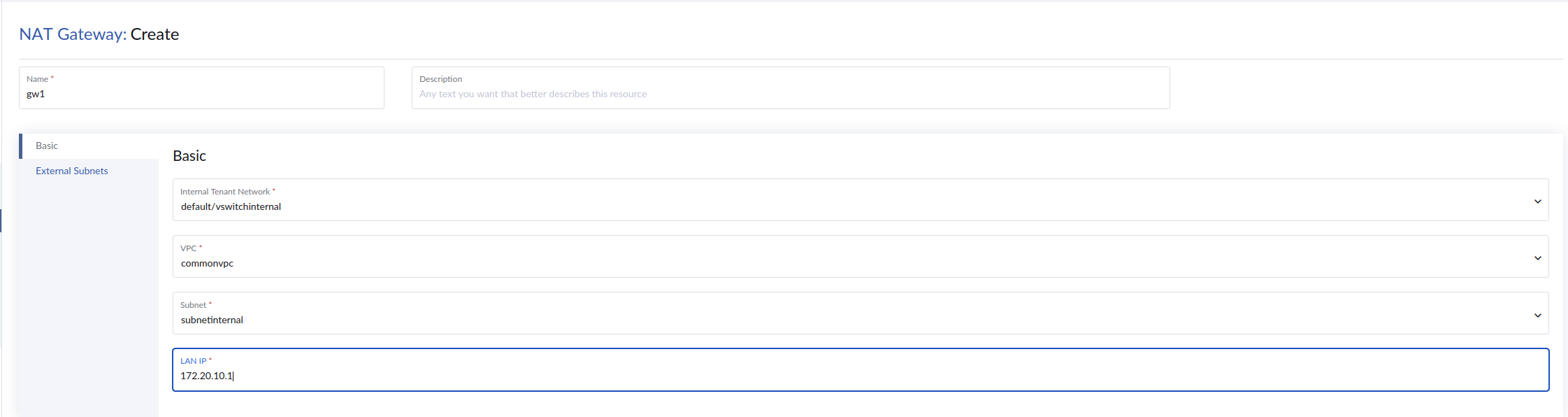
On the SUSE Virtualization UI, go to Overlay Networks → NAT & Internet → Gateways.
-
Click Create.
-
Specify a unique name for the VPC NAT gateway.
-
On the Basic tab, configure the following settings:
-
Internal Tenant Network: Name of the internal tenant network (for example,
vswitchinternal) -
VPC VPC of the internal tenant network subnet (for example,
commonvpc) -
Subnet: Subnet of the internal tenant network (for example,
subnetinternal) -
LAN IP: Gateway IP address of the internal tenant network
-
-
On the External Subnets tab, specify the subnet of the underlay external network (for example,
subnetexternal). -
Click Create.
Verification and sample output
-
Verify that a new StatefulSet (
vpc-nat-gw) and associated pod were created.kubectl get statefulset -n kube-system vpc-nat-gw-gw1 -o yaml apiVersion: apps/v1 kind: StatefulSet metadata: creationTimestamp: "2026-06-05T22:42:17Z" generation: 1 labels: app: vpc-nat-gw-gw1 ovn.kubernetes.io/vpc-nat-gw: "true" name: vpc-nat-gw-gw1 namespace: kube-system resourceVersion: "18233827" uid: ae7c9895-8a7f-46f6-b71d-be9f9b36b79a spec: persistentVolumeClaimRetentionPolicy: whenDeleted: Retain whenScaled: Retain podManagementPolicy: OrderedReady replicas: 1 revisionHistoryLimit: 10 selector: matchLabels: app: vpc-nat-gw-gw1 ovn.kubernetes.io/vpc-nat-gw: "true" serviceName: "" template: metadata: annotations: k8s.v1.cni.cncf.io/networks: default/vswitchinternal, kube-system/vswitchexternal ovn.kubernetes.io/vpc_nat_gw: gw1 vswitchexternal.kube-system.ovn.kubernetes.io/routes: '[{"dst":"0.0.0.0/0","gw":"10.115.55.254"}]' vswitchinternal.default.ovn.kubernetes.io/ip_address: 172.20.10.1 vswitchinternal.default.ovn.kubernetes.io/logical_switch: subnetinternal vswitchinternal.default.ovn.kubernetes.io/routes: '[{"dst":"10.55.0.0/16","gw":"172.20.10.1"}]' labels: app: vpc-nat-gw-gw1 ovn.kubernetes.io/vpc-nat-gw: "true" spec: affinity: {} containers: - command: - sleep - infinity env: - name: GATEWAY_V4 value: 10.115.55.254 - name: GATEWAY_V6 image: docker.io/kubeovn/vpc-nat-gateway:v1.16.1 imagePullPolicy: IfNotPresent lifecycle: postStart: exec: command: - sh - -c - sysctl -w net.ipv4.ip_forward=1 name: vpc-nat-gw resources: {} securityContext: allowPrivilegeEscalation: true privileged: true terminationMessagePath: /dev/termination-log terminationMessagePolicy: File dnsPolicy: ClusterFirst restartPolicy: Always schedulerName: default-scheduler securityContext: {} terminationGracePeriodSeconds: 0 updateStrategy: type: RollingUpdate status: availableReplicas: 1 collisionCount: 0 currentReplicas: 1 currentRevision: vpc-nat-gw-gw1-5659bc556b observedGeneration: 1 readyReplicas: 1 replicas: 1 updateRevision: vpc-nat-gw-gw1-5659bc556b updatedReplicas: 1$ kubectl describe pod vpc-nat-gw-gw1-0 -n kube-system Name: vpc-nat-gw-gw1-0 Namespace: kube-system Priority: 0 Service Account: default Node: hp-46/10.115.14.70 Start Time: Fri, 05 Jun 2026 22:42:18 +0000 Labels: app=vpc-nat-gw-gw1 apps.kubernetes.io/pod-index=0 controller-revision-hash=vpc-nat-gw-gw1-5659bc556b ovn.kubernetes.io/vpc-nat-gw=true statefulset.kubernetes.io/pod-name=vpc-nat-gw-gw1-0 Annotations: cni.projectcalico.org/containerID: 1b133ea1f17aac64c3d70bde83e1244fe07eb5206a78ec7c76f6099a450e093f cni.projectcalico.org/podIP: 10.52.1.30/32 cni.projectcalico.org/podIPs: 10.52.1.30/32 k8s.v1.cni.cncf.io/network-status: [{ "name": "k8s-pod-network", "interface": "eth0", "ips": [ "10.52.1.30" ], "mac": "4a:26:76:cd:f3:fa", "default": true, "dns": {} },{ "name": "default/vswitchinternal", "interface": "net1", "ips": [ "172.20.10.1" ], "mac": "22:02:d9:04:e7:bb", "dns": {} },{ "name": "kube-system/vswitchexternal", "interface": "net2", "ips": [ "10.115.48.6" ], "mac": "c6:1d:c3:e8:a5:76", "dns": {}, "gateway": [ "10.115.55.254" ] }] k8s.v1.cni.cncf.io/networks: default/vswitchinternal, kube-system/vswitchexternal ovn.kubernetes.io/vpc_nat_gw: gw1 ovn.kubernetes.io/vpc_nat_gw_init: true vswitch2.default.ovn.kubernetes.io/vpc_cidrs: ["172.30.0.0/24"] vswitchexternal.kube-system.ovn.kubernetes.io/allocated: true vswitchexternal.kube-system.ovn.kubernetes.io/cidr: 10.115.48.0/21 vswitchexternal.kube-system.ovn.kubernetes.io/gateway: 10.115.55.254 vswitchexternal.kube-system.ovn.kubernetes.io/ip_address: 10.115.48.6 vswitchexternal.kube-system.ovn.kubernetes.io/logical_switch: subnetexternal vswitchexternal.kube-system.ovn.kubernetes.io/mac_address: c6:1d:c3:e8:a5:76 vswitchexternal.kube-system.ovn.kubernetes.io/pod_nic_type: veth-pair vswitchexternal.kube-system.ovn.kubernetes.io/provider_network: pn1 vswitchexternal.kube-system.ovn.kubernetes.io/routed: true vswitchexternal.kube-system.ovn.kubernetes.io/routes: [{"dst":"0.0.0.0/0","gw":"10.115.55.254"}] vswitchexternal.kube-system.ovn.kubernetes.io/vlan_id: 2017 vswitchinternal.default.ovn.kubernetes.io/allocated: true vswitchinternal.default.ovn.kubernetes.io/cidr: 172.20.10.0/24 vswitchinternal.default.ovn.kubernetes.io/gateway: 172.20.10.1 vswitchinternal.default.ovn.kubernetes.io/ip_address: 172.20.10.1 vswitchinternal.default.ovn.kubernetes.io/logical_router: commonvpc vswitchinternal.default.ovn.kubernetes.io/logical_switch: subnetinternal vswitchinternal.default.ovn.kubernetes.io/mac_address: 22:02:d9:04:e7:bb vswitchinternal.default.ovn.kubernetes.io/pod_nic_type: veth-pair vswitchinternal.default.ovn.kubernetes.io/routed: true vswitchinternal.default.ovn.kubernetes.io/routes: [{"dst":"10.55.0.0/16","gw":"172.20.10.1"}] vswitchinternal.default.ovn.kubernetes.io/vpc_cidrs: ["172.20.10.0/24"] Status: Running IP: 10.52.1.30 IPs: IP: 10.52.1.30 Controlled By: StatefulSet/vpc-nat-gw-gw1 Containers: vpc-nat-gw: Container ID: containerd://4e0d66777f1e56f6402e1106fba2feb9b4a6f0eaa467101a5f7b159ff9981c04 Image: docker.io/kubeovn/vpc-nat-gateway:v1.16.1 Image ID: docker.io/kubeovn/vpc-nat-gateway@sha256:59afff3ee0583378ae73ead77f3459745fef300d111f3a5e60ca555b19ca8e7b Port: <none> Host Port: <none> Command: sleep infinity State: Running Started: Fri, 05 Jun 2026 22:42:29 +0000 Ready: True Restart Count: 0 Environment: GATEWAY_V4: 10.115.55.254 GATEWAY_V6: Mounts: /var/run/secrets/kubernetes.io/serviceaccount from kube-api-access-97xmd (ro) Conditions: Type Status PodReadyToStartContainers True Initialized True Ready True ContainersReady True PodScheduled True Volumes: kube-api-access-97xmd: Type: Projected (a volume that contains injected data from multiple sources) TokenExpirationSeconds: 3607 ConfigMapName: kube-root-ca.crt Optional: false DownwardAPI: true QoS Class: BestEffort Node-Selectors: <none> Tolerations: node.kubernetes.io/not-ready:NoExecute op=Exists for 300s node.kubernetes.io/unreachable:NoExecute op=Exists for 300s Events: <none> -
Verify that the network interfaces of the
vpc-nat-gwpod are attached correctly (net1to the internal network andnet2to the external network).$ kubectl exec -it vpc-nat-gw-gw1-0 -n kube-system -- /bin/bash vpc-nat-gw-gw1-0:/kube-ovn# ip addr show 1: lo: <LOOPBACK,UP,LOWER_UP> mtu 65536 qdisc noqueue state UNKNOWN group default qlen 1000 link/loopback 00:00:00:00:00:00 brd 00:00:00:00:00:00 inet 127.0.0.1/8 scope host lo valid_lft forever preferred_lft forever inet6 ::1/128 scope host proto kernel_lo valid_lft forever preferred_lft forever 2: eth0@if9727: <BROADCAST,MULTICAST,UP,LOWER_UP> mtu 1450 qdisc noqueue state UP group default qlen 1000 link/ether 4a:26:76:cd:f3:fa brd ff:ff:ff:ff:ff:ff link-netnsid 0 inet 10.52.1.30/32 scope global eth0 valid_lft forever preferred_lft forever inet6 fe80::4826:76ff:fecd:f3fa/64 scope link proto kernel_ll valid_lft forever preferred_lft forever 9728: net1@if9729: <BROADCAST,MULTICAST,UP,LOWER_UP> mtu 1450 qdisc noqueue state UP group default link/ether 22:02:d9:04:e7:bb brd ff:ff:ff:ff:ff:ff link-netnsid 0 inet 172.20.10.1/24 brd 172.20.10.255 scope global net1 valid_lft forever preferred_lft forever inet6 fe80::2002:d9ff:fe04:e7bb/64 scope link proto kernel_ll valid_lft forever preferred_lft forever 9730: net2@if9731: <BROADCAST,MULTICAST,UP,LOWER_UP> mtu 1500 qdisc noqueue state UP group default link/ether c6:1d:c3:e8:a5:76 brd ff:ff:ff:ff:ff:ff link-netnsid 0 inet 10.115.48.6/21 brd 10.115.55.255 scope global net2 valid_lft forever preferred_lft forever inet 10.115.55.200/21 scope global secondary net2 valid_lft forever preferred_lft forever inet6 fe80::c41d:c3ff:fee8:a576/64 scope link proto kernel_ll valid_lft forever preferred_lft forever vpc-nat-gw-gw1-0:/kube-ovn# ip route show default via 10.115.55.254 dev net2 onlink 10.55.0.0/16 via 172.20.10.1 dev net1 10.115.48.0/21 dev net2 proto kernel scope link src 10.115.48.6 169.254.1.1 dev eth0 scope link 172.20.10.0/24 dev net1 proto kernel scope link src 172.20.10.1 172.30.0.0/24 via 172.20.10.1 dev net1 -
Verify that the provider network bridge (
br-pn1) is present and that the patch port (patch-localnet.subnetexternal-to-br-int) connects the external subnet tobr-int.$ kubectl exec -it ovs-ovn-q92zk -n kube-system -- /bin/bash Defaulted container "openvswitch" out of: openvswitch, hostpath-init (init) nobody@hp-65:/kube-ovn$ ovs-vsctl show 54ef5649-9fe6-4944-865b-30a591c95121 Bridge br-pn1 Port br-pn1 Interface br-pn1 type: internal Port patch-localnet.subnetexternal-to-br-int Interface patch-localnet.subnetexternal-to-br-int type: patch options: {peer=patch-br-int-to-localnet.subnetexternal} Port eno50 trunks: [0, 2017] Interface eno50 Bridge br-int fail_mode: secure datapath_type: system Port br-int Interface br-int type: internal Port "6159403e_net1_h" Interface "6159403e_net1_h" Port mirror0 Interface mirror0 type: internal Port ovn0 Interface ovn0 type: internal Port patch-br-int-to-localnet.subnetexternal Interface patch-br-int-to-localnet.subnetexternal type: patch options: {peer=patch-localnet.subnetexternal-to-br-int} Port "7e8b0_37a8eec_h" Interface "7e8b0_37a8eec_h" Port "6159403e_net2_h" Interface "6159403e_net2_h" ovs_version: "3.5.3"
Configuring SNAT for external connectivity from overlay virtual machines
-
Create an external IP.
-
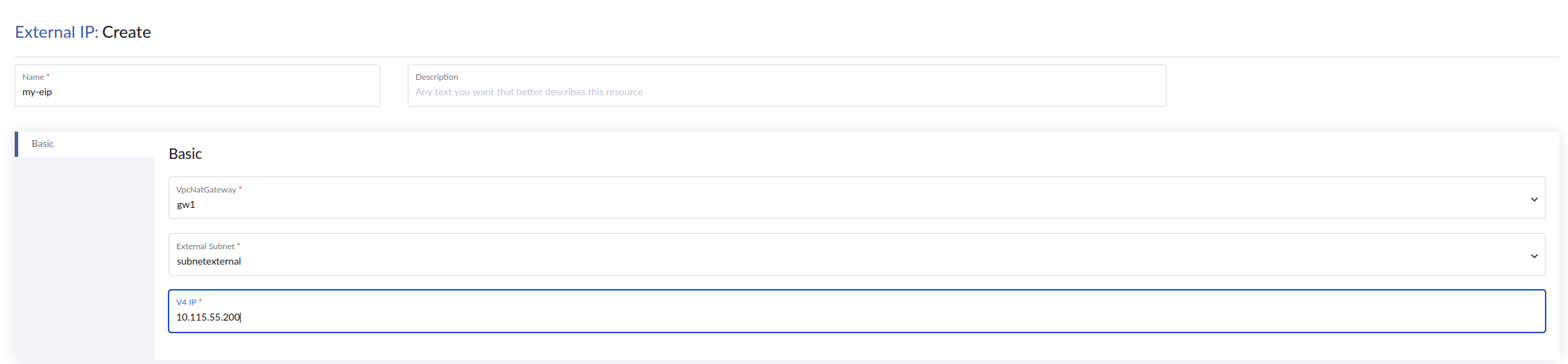
On the SUSE Virtualization UI, go to Overlay Networks → NAT & Internet → External IPs.
-
Click Create.
-
Specify a unique name for the external IP.
-
On the Basic tab, configure the following settings:
-
VpcNatGateway: Name of the VPC NAT gateway (for example,
gw1) -
External Subnet: Subnet of the underlay external network (for example,
subnetexternal) -
V4 IP: Available IP address from the external subnet CIDR range to be used as a public IP for SNAT/DNAT
-
-
Click Create.
-
-
Create an SNAT rule.
-
On the SUSE Virtualization UI, go to Overlay Networks → NAT & Internet → Source Rules.

-
Click Create.
-
Specify a unique name for the SNAT rule.
-
On the Basic tab, configure the following settings:
-
EIP: External IP (for example,
my-eip) -
Internal CIDR: CIDR of the internal tenant subnet
-
-
Click Create.
-
Verification and sample output
-
Verify the status of the external IP.
kubectl get eip NAME IP MAC NAT NATGWDP READY my-eip 10.115.55.200 52:1b:4f:1d:14:ce dnat,snat gw1 true -
Verify that the SNAT rule was created in the iptables of the VPC NAT gateway pod.
Example:
vpc-nat-gw-gw1-0:/kube-ovn# iptables-legacy-save -t nat
# Generated by iptables-save v1.8.11 on Sat Mar  7 00:28:34 2026
*nat
:PREROUTING ACCEPT [2949:373475]
:INPUT ACCEPT [107:31097]
:OUTPUT ACCEPT [0:0]
:POSTROUTING ACCEPT [1:60]
:DNAT_FILTER - [0:0]
:EXCLUSIVE_DNAT - [0:0]
:EXCLUSIVE_SNAT - [0:0]
:SHARED_DNAT - [0:0]
:SHARED_SNAT - [0:0]
:SNAT_FILTER - [0:0]
-A PREROUTING -j DNAT_FILTER
-A POSTROUTING -j SNAT_FILTER
-A SHARED_SNAT -s 172.20.10.0/24 -o net2 -j SNAT --to-source 10.115.55.200 --random-fully
-A SNAT_FILTER -j EXCLUSIVE_SNAT
-A SNAT_FILTER -j SHARED_SNAT
COMMIT
Creating a virtual machine
-
Create a virtual machine and attach it to the
vswitchinternaloverlay network. -
From within the virtual machine’s guest operating system, ping an external IP address (for example, 8.8.8.8). The ping must succeed.
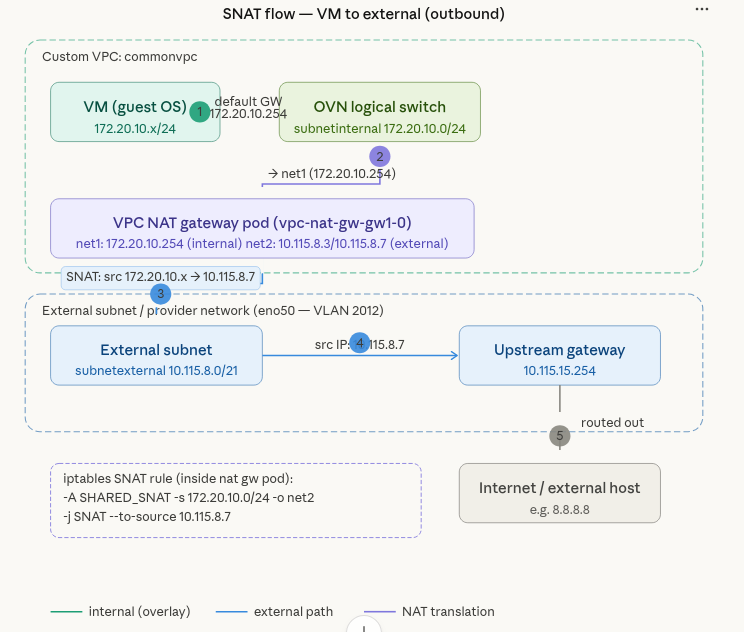
Traffic leaving the virtual machine enters the vpc-nat-gw pod on interface`net1` and routes out through interface net2. An iptables SNAT rule translates the source IP from the internal subnet (172.20.10.0/24) to the external IP (10.115.55.200) for external connectivity.
Configuring DNAT for inbound access (external to overlay virtual machines)
-
On the SUSE Virtualization UI, go to Overlay Networks → NAT & Internet → Destination Rules.
-
Click Create.
-
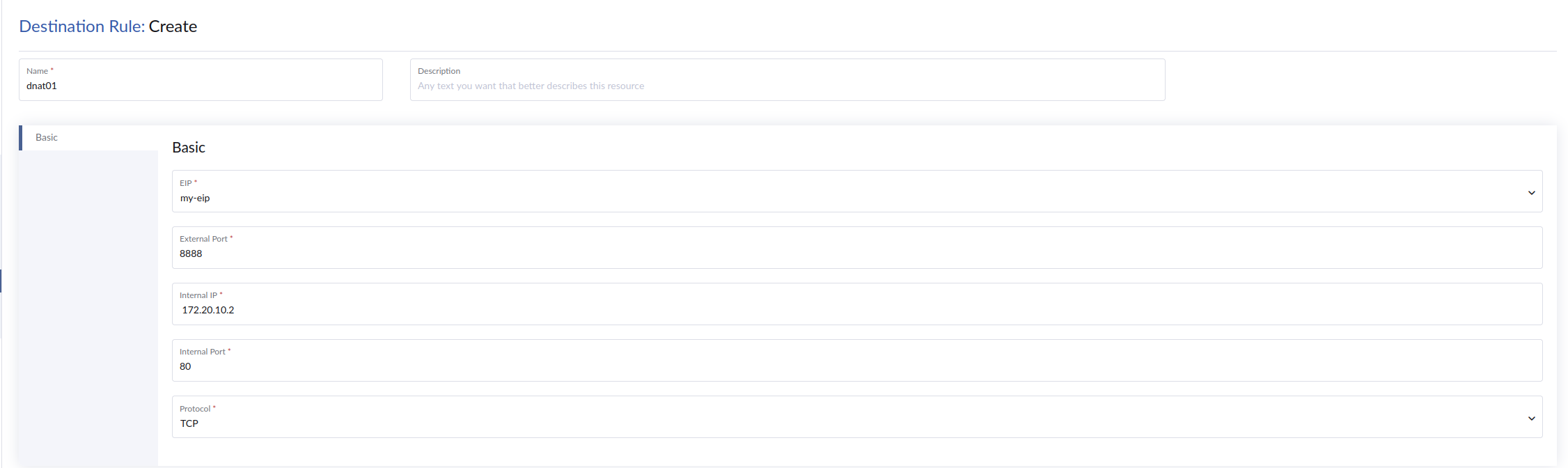
Specify a unique name for the DNAT rule.
-
On the Basic tab, configure the following settings:
-
EIP: External IP assigned to the VPC NAT gateway (for example,
my-eip) -
External Port: Port on which incoming traffic is received from external clients
-
Internal IP: Destination IP address to which incoming traffic is forwarded (the IP address of the target overlay virtual machine)
-
Internal Port: Destination port on the internal host to which incoming traffic is translated and forwarded
-
Protocol:
TCPorUDP
-
-
Click Create.
Verification and sample output
Verify that the DNAT iptables rule exists inside the VPC NAT gateway pod.
Example:
vpc-nat-gw-gw1-0:/kube-ovn# iptables-legacy -t nat -L -n -v 2>/dev/null | grep -E "DNAT"
3051  392K DNAT_FILTER  all  --  *      *       0.0.0.0/0            0.0.0.0/0
Chain DNAT_FILTER (1 references)
3051  392K EXCLUSIVE_DNAT  all  --  *      *       0.0.0.0/0            0.0.0.0/0
3051  392K SHARED_DNAT  all  --  *      *       0.0.0.0/0            0.0.0.0/0
Chain EXCLUSIVE_DNAT (1 references)
Chain SHARED_DNAT (1 references)
    1    60 DNAT       tcp  --  *      *       0.0.0.0/0            10.115.55.200        tcp dpt:8888 to:172.20.10.2:80
Creating a virtual machine
Create a virtual machine attached to the overlay network on subnetinternal, then install NGINX on the virtual machine to verify inbound connectivity.
$ sudo apt update
$ sudo apt install nginx -y
$ sudo systemctl status nginx

test nginx locally on the VM
$ curl http://127.0.0.1

Now curl -k http://10.115.55.200:8888 from external must be successful