|
This is unreleased documentation for SUSE® Virtualization v1.9 (Dev). |
Host Network Configuration and Underlay Selection
Although SUSE Virtualization can configure a management VLAN during installation if a VID is provided, production environments often demand more granular control over the network stack. Relying solely on the management interface can create performance bottlenecks and security risks.
The HostNetworkConfig resource addresses these limitations by managing VLAN sub-interfaces and IP assignments across all cluster nodes. This approach offers the following benefits:
-
Layer 3 routed storage: High-performance storage networks often require dedicated routed subnets with static or DHCP addressing that are entirely separate from the management plane.
-
Physical traffic isolation: Operators can offload virtual machine and application traffic to secondary physical uplinks and gateways, ensuring management access remains responsive during high network load.
-
External service integration: Edge and cloud deployments may require non-management NICs to hold IPv4 addresses for peering with BGP, OSPF, or other external routing services.
-
Kube-OVN underlay optimization: By default, Kube-OVN uses the management interface for virtual machine overlay traffic. The
HostNetworkConfigresource allows you to designate a dedicated VLAN as the underlay, which eliminates traffic contention and enhances isolation.
SUSE Virtualization VLAN and Layer 3 extension
SUSE Virtualization supports VLAN sub-interfaces on cluster networks, enabling static IPv4 assignment directly to the node. This unlocks dedicated Layer 3 paths to external infrastructure, facilitating the following:
-
High-speed, low-latency connectivity to external storage arrays, such as iSCSI and NFS.
-
Hardware-level separation for sensitive applications and tenant data.
-
Direct peering with existing physical routers and switches.
Kube-OVN underlay support
You can further designate a VLAN interface as the underlay for Kube-OVN. By offloading virtual machine inter-node traffic to a dedicated underlay, you eliminate contention with the control plane, significantly boosting both network throughput and cluster security.
Prerequisites
Before creating a HostNetworkConfig resource, ensure the following requirements are met:
-
The target cluster network (such as
cn-1ormgmt) is created and in aReadystate. -
A
VlanConfigorNetworkConfigresource is created for the cluster network and covers the intended nodes. -
For static mode: Valid CIDR addresses are prepared for each node.
-
For underlay selection: The
HostNetworkConfigresource covers all nodes in the cluster.
Host network configuration
Configuring host networks without node selectors
-
On the SUSE Virtualization UI, go to Networks → Host Networks.
-
Click Create.
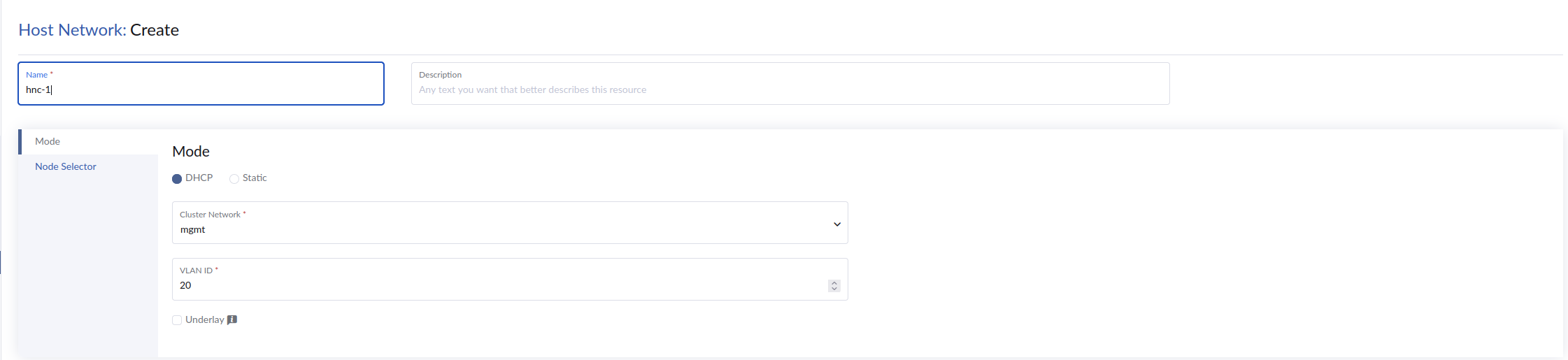
-
Specify a unique name for the host network.
-
On the Mode tab, configure the following settings:
-
Mode: Specify how IP addresses are assigned to the host network interface.
-
DHCP: Automatically assigns IP addresses from a DHCP server.
-
Static: Requires you to manually specify the IP address, subnet mask, and gateway.
-
-
Cluster Network: Select the cluster network to associate with this host network.
-
VLAN ID: Specify the VLAN ID for tagged traffic.
-
-
Click Create.
Configuring host networks with node selectors
-
On the SUSE Virtualization UI, go to Networks → Host Networks.
-
Click Create.
-
Specify a unique name for the host network.
-
On the Mode tab, configure the following settings:
-
Mode: Specify how IP addresses are assigned to the host network interface.
-
DHCP: Automatically assigns IP addresses from a DHCP server.
-
Static: Requires you to manually specify the IP address, subnet mask, and gateway.
-
-
Cluster network: Select the cluster network to associate with this host network.
-
VLAN ID: Specify the VLAN ID for tagged traffic.
-
-
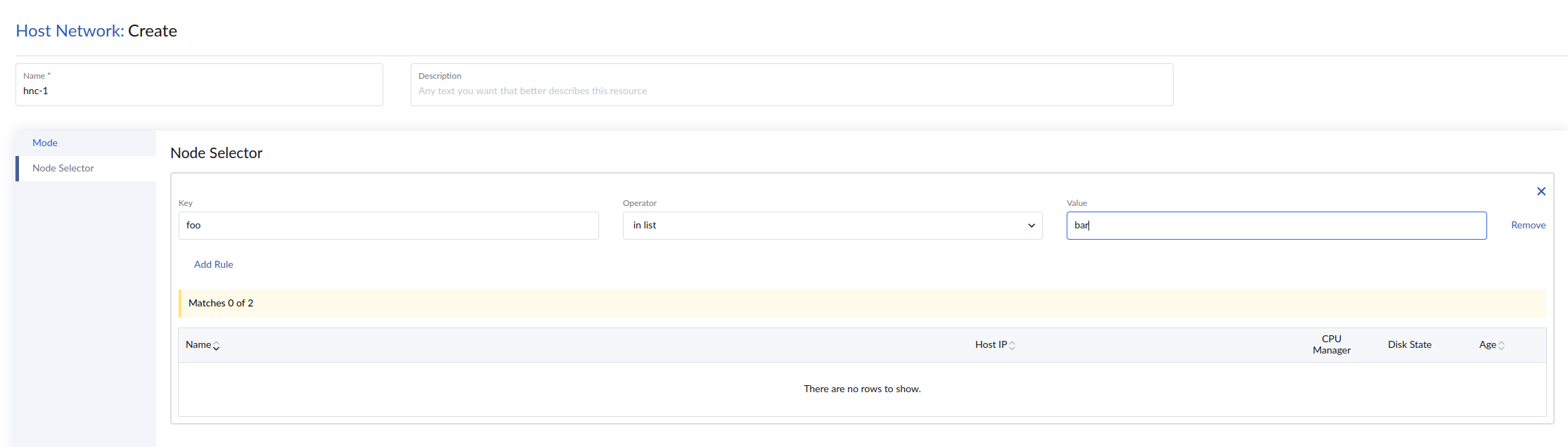
On the Node Selector tab, define rules that match specific labels applied to nodes.
SUSE Virtualization applies the host network configuration only to nodes targeted by the defined node selector rules.
-
Click Create.
Underlay for SUSE Virtualization overlay networking
By default, Kube-OVN uses the management interface mgmt-br.<vlan> as the underlay tunnel interface for inter-node virtual machine traffic. However, you can designate any HostNetworkConfig resource with a configured VLAN interface to function as the underlay instead.
Modifying this default configuration provides the following architectural advantages:
-
Separates inter-node (VXLAN) virtual machine traffic from management traffic, reducing contention.
-
Allows use of a dedicated physical NIC and VLAN for virtual machine traffic.
-
Enforces strict separation between the management plane and the data plane.
Configuring the underlay
Select the Underlay option to enable a custom underlay interface on the host network.
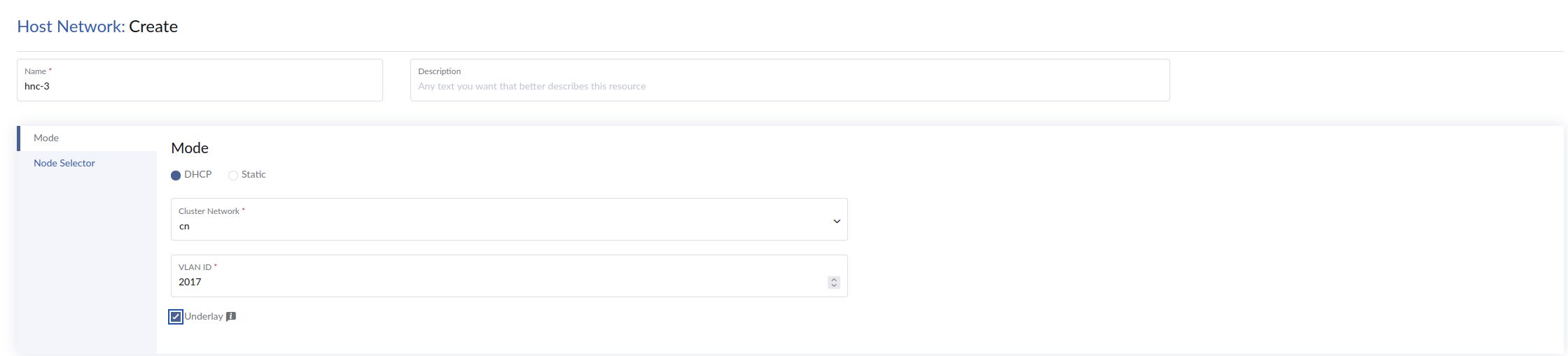
When the Underlay option is enabled, SUSE Virtualization orchestrates the following system modifications:
-
The
hostnetworkconfigagent updates theovn.kubernetes.io/tunnel_interfaceannotation on each node to point to the newly created sub-interface (such ascn-1-br.2012). -
Kube-OVN automatically reconfigures the remote VXLAN tunnel endpoints inside the OVS bridges on every node to route traffic through the new sub-interface IP addresses.
|
Allow time for the Kube-OVN controller to update the remote endpoints on the default OVS bridge. |
Example (output from node1):
kubectl exec -it ovs-ovn-pk57r -n kube-system -- /bin/bash

ovs-vsctl show
992c73d7-68cd-4422-8df4-84cd2bea12fb
    Bridge br-int
        fail_mode: secure
        datapath_type: system
        Port ovn0
            Interface ovn0
                type: internal
        Port ovn-a33a48-0
            Interface ovn-a33a48-0
                type: vxlan
                options: {csum="true", key=flow, local_ip="10.115.8.15", remote_ip="10.115.8.16","10.115.8.17"}
        Port br-int
            Interface br-int
                type: internal
        Port mirror0
            Interface mirror0
                type: internal
    ovs_version: "3.5.3"
To disable the custom underlay interface, clear the Underlay option. The agent automatically restores the ovn.kubernetes.io/tunnel_interface annotation to the default management interface, and Kube-OVN reconfigures the tunnel endpoints accordingly.
Lifecycle behavior
-
Cluster node scaling
-
DHCP mode: When a new node joins the cluster, SUSE Virtualization automatically provisions the VLAN interface and requests a DHCP lease on that node.
-
Static mode: New nodes are not configured automatically. You must add a corresponding entry for the new node to the
spec.ipsmap and reapply theHostNetworkConfigmanifest.
-
-
Node reboots: All VLAN sub-interfaces and IP address assignments are persistent. Following a node reboot, SUSE Virtualization automatically restores the interfaces, resumes DHCP renewals, and reapplies static IP addresses as configured.
-
IP allocation mode changes: When you switch between DHCP and static, or modify existing static IP entries, SUSE Virtualization removes the existing IP addresses from the sub-interface before applying the new network configuration.
-
HostNetworkConfigresource deletion: SUSE Virtualization deletes the VLAN sub-interface and removes the corresponding VLAN ID from the bridge and uplink ports on all affected nodes. -
VlanConfigresource modification or deletion: If the resource is deleted or its node selector changes, SUSE Virtualization automatically removes all associatedHostNetworkConfigVLAN sub-interfaces from any nodes that no longer possess a valid uplink configuration.
Verifying the configuration
After applying a HostNetworkConfig resource, log into a cluster node to verify the interface and IP address status.
-
Check the IP address assignment.
ip addr show cn-1-br.2012Expected output for a DHCP configuration appears similar to the following:
cn-1-br.2012@cn-1-br: <BROADCAST,MULTICAST,UP,LOWER_UP> mtu 1500 ... inet 10.115.8.15/21 brd 10.115.15.255 scope global cn-1-br.2012 -
Check the bridge VLAN membership.
bridge vlan showThe expected output includes the following:
# cn-1-bo 1 PVID Egress Untagged # 2012 # cn-1-br 1 PVID Egress Untagged # 2012 -
Check the status of each node.
kubectl get hostnetworkconfig cn1-vlan2012-dhcp -o yamlThe
status.nodeStatusfield tracks theReadystate of each node and lists active error conditions.Example of output:
apiVersion: network.harvesterhci.io/v1beta1
kind: HostNetworkConfig
metadata:
  name: cn1-vlan2012-dhcp
spec:
  clusterNetwork: cn-1
  mode: dhcp
  vlanID: 2012
status:
  nodeStatus:
    hp-46:
      clusterNetwork: cn-1
      conditions:
      - message: ""
        status: "True"
        type: ready
      mode: dhcp
      vlanID: 2012
    hp-65:
      clusterNetwork: cn-1
      conditions:
      - message: ""
        status: "True"
        type: ready
      mode: dhcp
      vlanID: 2012
|
If a node has multiple host interfaces, do not attach them to the same VLAN or subnet. This restriction applies to interfaces configured manually on the host and those configured through DHCP Response Misrouting VLAN interfaces used in a cluster network are derived from the same underlying bridge and consequently share the same MAC address. This shared MAC address can cause DHCP response misrouting. When multiple host interfaces from the same cluster network reside on the same VLAN, DHCP responses may be incorrectly associated with an existing interface instead of a newly created one. For example, if Ambiguous Routing Behavior Additionally, configuring multiple interfaces in the same VLAN and subnet results in ambiguous routing. The Linux kernel typically installs a single connected route for a given subnet. If multiple interfaces are attached to the same VLAN and subnet, the kernel may associate the subnet route with only one of those interfaces, causing traffic to be forwarded through an unintended physical path. For example, host networks on cluster networks |
Limitations
-
Only tagged VLANs with a VLAN ID between
1and4094are supported. -
Only IPv4 addresses can be assigned to VLAN sub-interfaces.
-
IP address allocation must be handled via DHCP or manually specified static addresses. Direct integration with external IPAM systems is not supported.
-
Only one
HostNetworkConfigresource can be designated as the underlay at any given time. The validating webhook rejects any attempt to set thespec.underlayfield totrueon a second resource. -
A
HostNetworkConfigresource used as the underlay must cover all nodes in the cluster. The webhook rejects configurations where the associated cluster network orVlanConfigresource does not cover all active nodes. -
Underlay selection is only supported for the default Kube-OVN bridge. Custom OVS bridge setups are not supported.
-
The
spec.vlanIDandspec.clusterNetworkfields are immutable once the resource is created. To modify their values, you must delete the resource and create a new one. -
The webhook rejects attempts to modify or delete resources in the following situations:
Resource Description Situation HostNetworkConfigThe resource is actively used as an underlay.
Virtual machines are running on overlay networks.
VlanConfigThe resource is used by an active underlay.
VirtualMachineInstance (VMI) objects are present in the cluster.