配置 Keycloak (SAML)
如果您的组织使用 Keycloak 身份提供者(IdP)进行用户身份验证,您可以配置 Rancher 以允许用户使用其 IdP 凭据登录。
先决条件
-
您必须配置一个 Keycloak IdP 服务器。
-
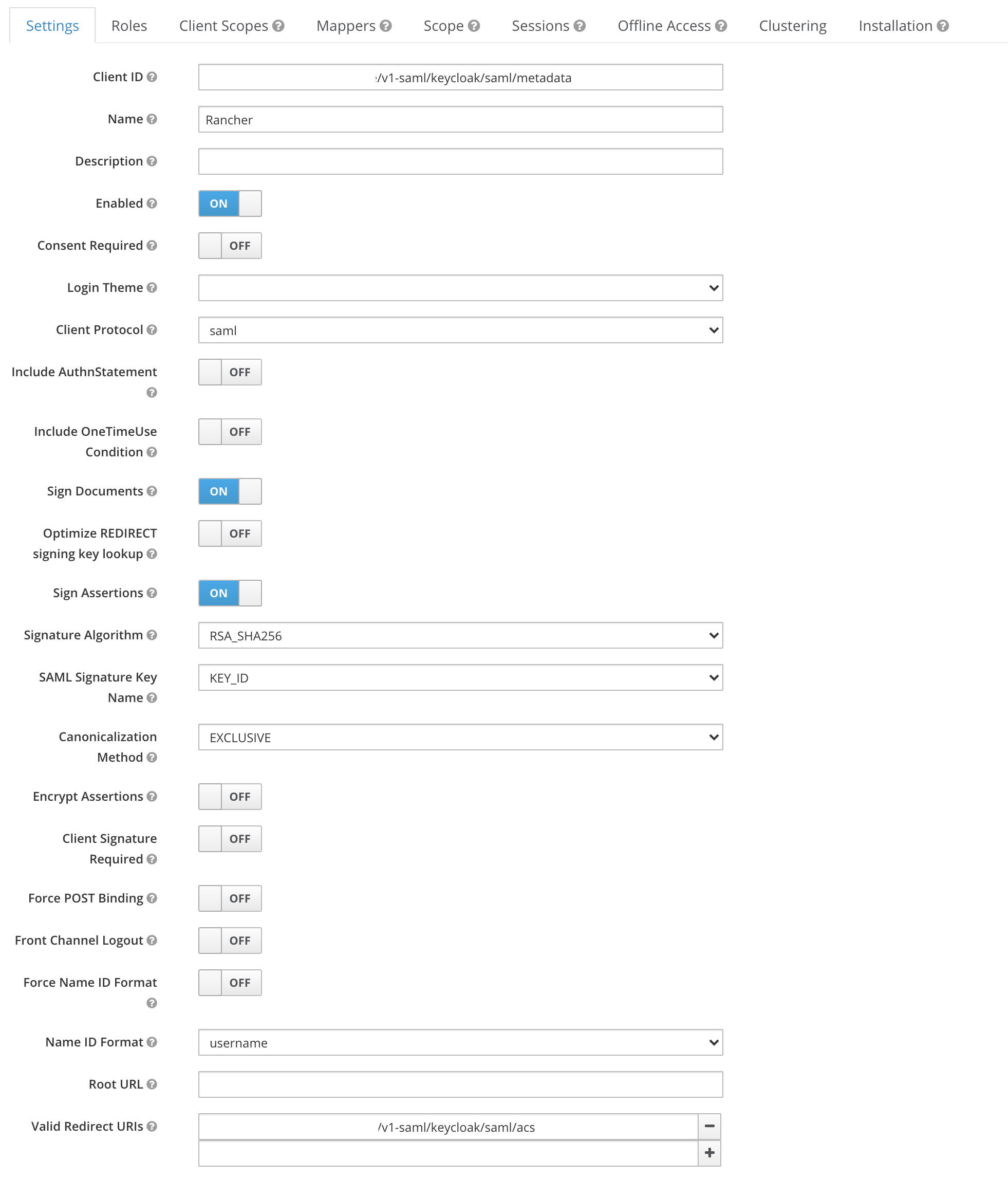
在 Keycloak 中,创建一个 新的 SAML 客户端,并使用以下设置。请参阅 Keycloak 文档 以获取帮助。
设置 值 Sign DocumentsON1Sign AssertionsON1所有其他
ON/OFF设置OFFClient ID要么是
https://yourRancherHostURL/v1-saml/keycloak/saml/metadata,要么是 Rancher Keycloak 配置的Entry ID Field中配置的值2Client Name(例如 rancher)Client ProtocolSAMLValid Redirect URIhttps://yourRancherHostURL/v1-saml/keycloak/saml/acs1:可选地,您可以启用这两个设置中的一个或两个。 2:在配置并保存 SAML 提供者之前,Rancher SAML 元数据不会生成。
-
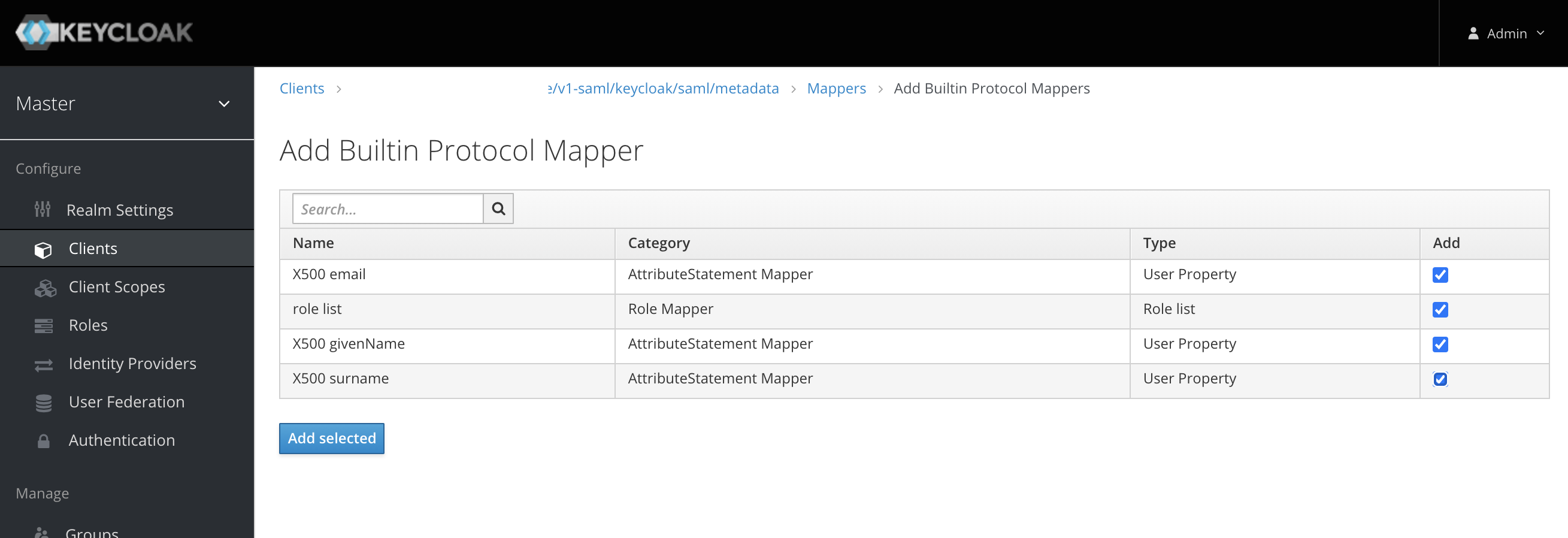
在新的 SAML 客户端中,创建映射器以暴露用户字段
-
添加所有 "内置协议映射器"
-
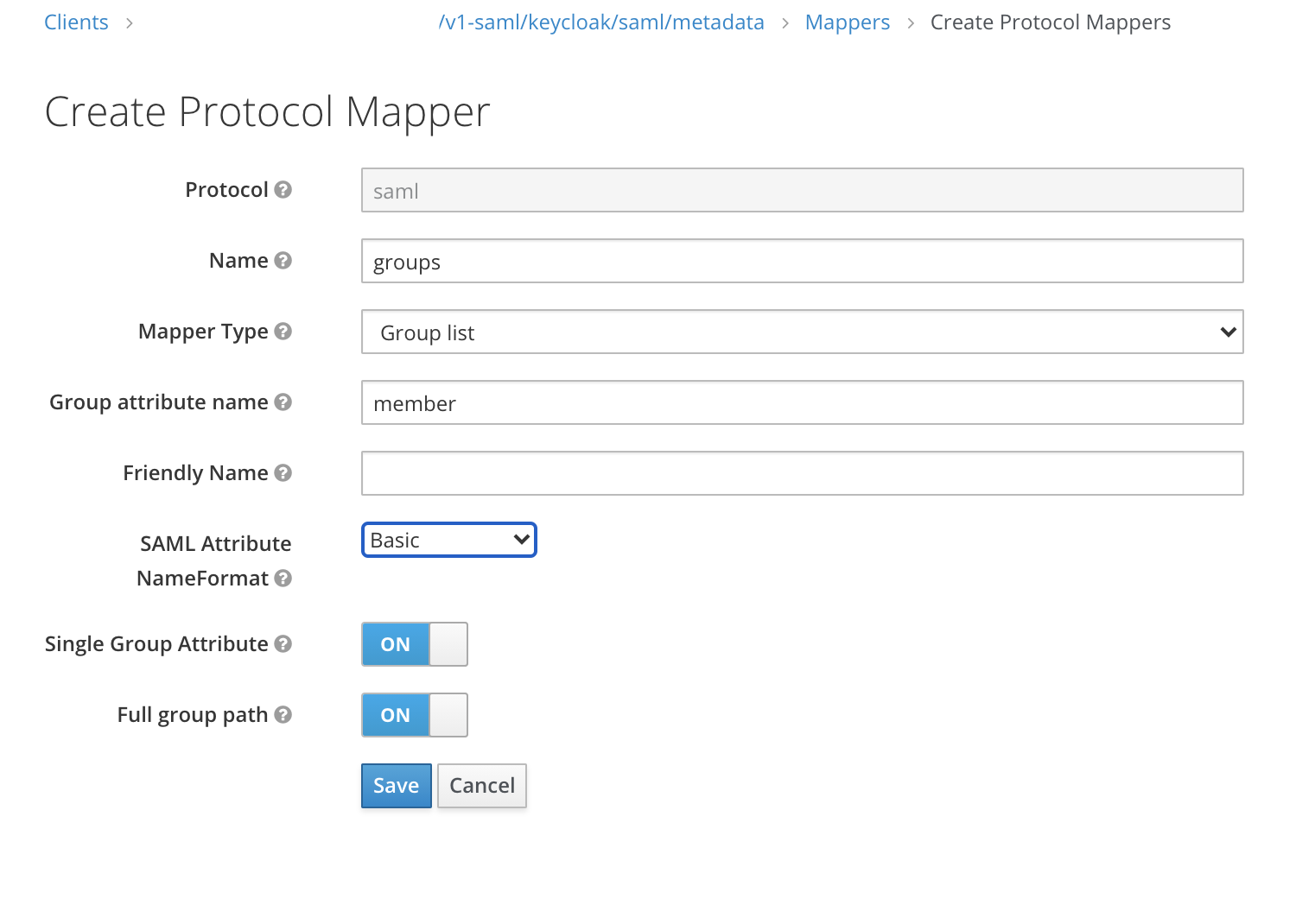
创建一个新的 "组列表" 映射器,将成员属性映射到用户的组
-
获取 IDP 元数据
-
Keycloak 5 及更早版本
-
Keycloak 6-13
-
Keycloak 14+
要获取 IDP 元数据,请从您的 Keycloak 客户端导出一个 metadata.xml 文件。
在*安装*选项卡中,选择*SAML元数据IDPSSODescriptor*格式选项并下载您的文件。
-
在*配置*部分,单击*领域设置*选项卡。
-
单击*常规*选项卡。
-
在*端点*字段中,单击*SAML 2.0 身份提供者元数据*。
验证IDP元数据包含以下属性:
xmlns:md="urn:oasis:names:tc:SAML:2.0:metadata"
xmlns:saml="urn:oasis:names:tc:SAML:2.0:assertion"
xmlns:ds="http://www.w3.org/2000/09/xmldsig#"
某些浏览器,如Firefox,可能会呈现/处理文档,使内容看起来已被修改,并且某些属性似乎缺失。在这种情况下,请使用可以通过您的浏览器找到的原始响应数据。
以下是Firefox的示例过程,但在其他浏览器中会略有不同:
-
按*F12*访问开发者控制台。
-
单击*网络*选项卡。
-
在表格中,单击包含`descriptor`的行。
-
在详细信息窗格中,单击*响应*选项卡。
-
复制原始响应数据。
获得的 XML 包含 EntitiesDescriptor 作为根元素。Rancher 期望根元素为 EntityDescriptor,而不是 EntitiesDescriptor。因此,在将此XML传递给Rancher之前,请按照以下步骤进行调整:
-
将`EntitiesDescriptor`中未在`EntityDescriptor`中出现的所有属性复制到`EntityDescriptor`中。
-
从开头删除`<EntitiesDescriptor>`标签。
-
从 XML 的末尾删除
</EntitiesDescriptor>。
您将得到类似下面示例的内容:
<EntityDescriptor xmlns="urn:oasis:names:tc:SAML:2.0:metadata" xmlns:dsig="http://www.w3.org/2000/09/xmldsig#" entityID="https://{KEYCLOAK-URL}/auth/realms/{REALM-NAME}">
....
</EntityDescriptor>-
在*配置*部分,单击*领域设置*选项卡。
-
单击*常规*选项卡。
-
在*端点*字段中,单击*SAML 2.0 身份提供者元数据*。
验证IDP元数据包含以下属性:
xmlns:md="urn:oasis:names:tc:SAML:2.0:metadata"
xmlns:saml="urn:oasis:names:tc:SAML:2.0:assertion"
xmlns:ds="http://www.w3.org/2000/09/xmldsig#"
某些浏览器,如Firefox,可能会呈现/处理文档,使内容看起来已被修改,并且某些属性似乎缺失。在这种情况下,请使用可以通过您的浏览器找到的原始响应数据。
以下是Firefox的示例过程,但在其他浏览器中会略有不同:
-
按*F12*访问开发者控制台。
-
单击*网络*选项卡。
-
在表格中,单击包含`descriptor`的行。
-
在详细信息窗格中,单击*响应*选项卡。
-
复制原始响应数据。
在 Rancher 中配置 Keycloak
-
在左上角,点击 ☰ > 用户与身份验证。
-
在左侧导航菜单中,点击 身份验证提供者。
-
单击 Keycloak SAML。
-
完成 配置 Keycloak 账户 表单。有关填写表单的帮助,请参见 配置参考。
-
完成 配置 Keycloak 账户 表单后,单击 启用。
Rancher 会将您重定向到 IdP 登录页面。输入与 Keycloak IdP 进行身份验证的凭据,以验证您的 Rancher Keycloak 配置。
您可能需要禁用弹出窗口拦截器才能查看IdP登录页面。
*结果:*Rancher 已配置为与 Keycloak 一起使用。您的用户现在可以使用他们的 Keycloak 登录凭据登录 Rancher。
|
SAML提供者注意事项
|
配置参考
| 字段 | 说明 |
|---|---|
显示名称字段 |
包含用户显示名称的属性。 |
用户名字段 |
包含用户名/名的属性。 |
UID 字段 |
每个用户唯一的属性。 |
组字段 |
为管理组成员资格创建条目。 |
实体 ID 字段 |
需要配置为 Keycloak 客户端中的客户端 ID 的 ID。 |
Rancher API 主机 |
您的 Rancher 服务器的 URL。 |
私钥/证书 |
一个密钥/证书对,用于在 Rancher 和您的 IdP 之间创建安全外壳通道。 |
IDP-metadata |
您从IdP服务器导出的`metadata.xml`文件。 |
|
您可以使用 openssl 命令生成一个密钥/证书对。例如: openssl req -x509 -sha256 -nodes -days 365 -newkey rsa:2048 -keyout myservice.key -out myservice.cert |
附录:查错
如果您在测试与 Keycloak 服务器的连接时遇到问题,请首先仔细检查您的 SAML 客户端的配置选项。您还可以检查Rancher日志,以帮助确定问题的原因。调试日志可能包含有关错误的更详细信息。请参阅如何启用调试日志中的文档。
您没有被重定向到 Keycloak。
当您点击 使用 Keycloak 进行身份验证 时,您没有被重定向到您的 IdP。
-
验证您的 Keycloak 客户端配置。
-
确保
Force Post Binding设置为OFF。
IdP 登录后显示禁止访问消息。
您已正确重定向到您的 IdP 登录页面,并且能够输入凭据,但之后您会收到 Forbidden 消息。
-
检查 Rancher 调试日志。
-
如果日志显示
ERROR: either the Response or Assertion must be signed,请确保在您的 Keycloak 客户端中将Sign Documents或Sign assertions设置为ON。
尝试访问 /v1-saml/keycloak/saml/metadata 时出现 HTTP 502 错误。
这通常是由于在配置 SAML 提供者之前未创建元数据。 尝试将 Keycloak 配置并保存为您的 SAML 提供者,然后访问元数据。
配置SAML单点注销(SLO)
Rancher supports the ability to configure SAML SLO. Options include logging out of the Rancher application only, logging out of Rancher and registered applications tied to the external authentication provider, or a prompt asking the user to choose between the previous options. The steps below outline configuration from the application GUI:
|
The Log Out behavior configuration section only appears if the SAML authentication provider allows for |
-
Sign in to Rancher using a standard user or an administrator role to configure SAML SLO.
-
In the top left corner, click ☰ > Users & Authentication.
-
In the left navigation menu, click Auth Provider.
-
Under the section Log Out behavior, choose the appropriate SLO setting as described below:
Setting Description Log out of Rancher and not authentication provider
Choosing this option will only logout the Rancher application and not external authentication providers.
Log out of Rancher and authentication provider (includes all other applications registered with authentication provider)
Choosing this option will logout Rancher and all external authentication providers along with any registered applications linked to the provider.
Allow the user to choose one of the above in an additional log out step
Choosing this option presents users with a choice of logout method as described above.
SAML 和 OpenLDAP 组权限
When you configure a SAML authentication provider backed by OpenLDAP, the SAML response might return only a subset of the groups that a user belongs to. The exact groups returned depend on the configuration of your external authentication provider.
Rancher assigns user permissions based strictly on the groups provided in the SAML response.
|
Even if you can search for and view specific OpenLDAP groups in the Rancher UI, you cannot use them to assign permissions if they are missing from the SAML response. To assign permissions successfully, verify that your SAML authentication provider is configured to return all necessary OpenLDAP groups. |