Upgrade from v1.7.x to v1.8.x
General information
An Upgrade button appears on the Dashboard screen whenever a new SUSE Virtualization version that you can upgrade to becomes available. For more information, see Start an upgrade.
Clusters running v1.7.x can upgrade to v1.8.x directly because SUSE Virtualization allows a maximum of one minor version upgrade for underlying components. SUSE Virtualization v1.7.0 and v1.7.1 use the same minor version of RKE2 (v1.34), while SUSE Virtualization v1.8.0 uses the next minor version (v1.35). For more information, see Upgrade paths.
For information about upgrading SUSE Virtualization in air-gapped environments, see Prepare an air-gapped upgrade.
|
Support for legacy BIOS booting is removed in v1.8.0. Existing SUSE Virtualization clusters that use this boot mode will continue to function, but upgrading to later versions may require re-installation in UEFI mode. To avoid issues and disruptions, use UEFI in new installations. |
Update the Harvester UI Extension on SUSE Rancher Prime v2.14
You must use a compatible version (v1.8.x) of the Harvester UI Extension to import SUSE Virtualization v1.8.x clusters on Rancher v2.14.
-
On the Rancher UI, go to local → Apps → Repositories.
-
Locate the repository named harvester, and then select ⋮ → Refresh.
-
Go to the Extensions screen.
-
Locate the extension named Harvester, and then click Update.
-
Select a compatible version, and then click Update.
-
Allow some time for the extension to be updated, and then refresh the screen.
Known issues
Virtual machines fail to migrate with "KubeVirt is not ready" error
After upgrading to v1.8.x, virtual machines may fail to migrate with the error message "KubeVirt is not ready". This issue occurs due to a race condition where a virt-handler pod is created without the annotations KubeVirt needs to determine whether the pod is up-to-date.
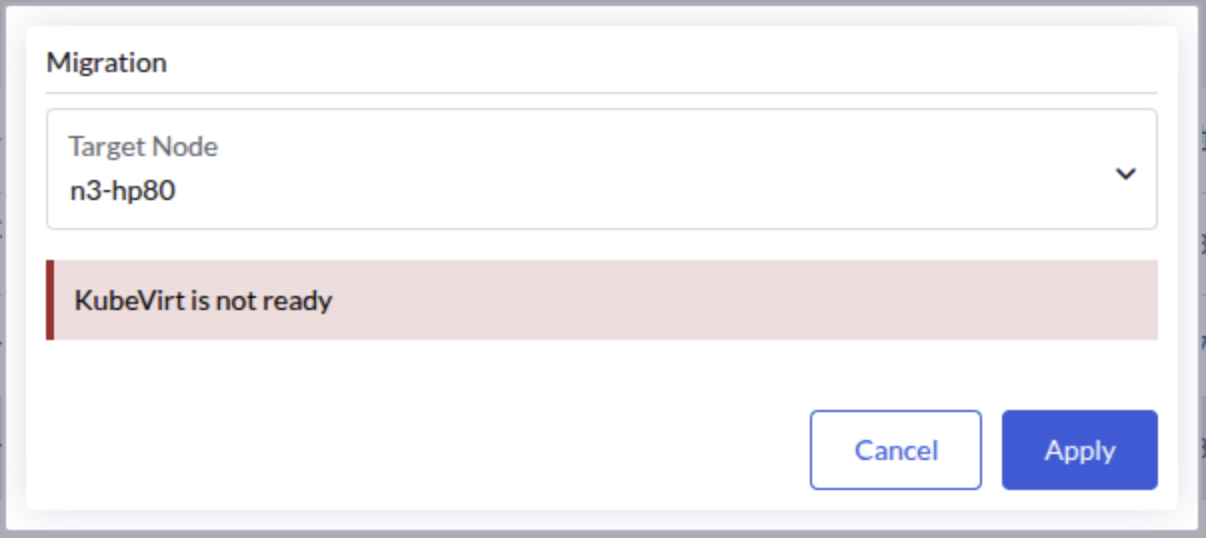
The KubeVirt operator continuously waits for the outdated virt-handler pod to terminate, preventing the KubeVirt custom resource from reaching the "Available" state. This blocks subsequent virtual machine operations, including live migration.
|
This issue has been observed in three-node clusters with one witness node, but it may also occur in other deployment configurations. |
Identifying the issue
-
Check the status of the KubeVirt custom resource.
kubectl get kubevirt/kubevirt -n harvester-system -o yaml | yq '.status.conditions'If your environment is affected, the
Availablecondition will be set toFalsewith the reasonDeploymentInProgress.- lastProbeTime: "2026-04-18T17:42:39Z" lastTransitionTime: "2026-04-18T17:42:39Z" message: Deploying version 1.7.0-150700.3.16.2 with registry registry.suse.com/suse/sles/15.7 reason: DeploymentInProgress status: "False" type: Available -
Check the
virt-operatorlogs.kubectl logs deployment/virt-operator -n harvester-system --tail 10 | grep waitingThe logs will contain messages indicating that the DaemonSet is waiting for outdated pods to terminate.
{"component":"virt-operator","level":"info","msg":"DaemonSet virt-handler waiting for out of date pods to terminate.","pos":"readycheck.go:63","timestamp":"2026-04-20T02:19:14.503468Z"} -
Identify the affected
virt-handlerpod by checking which instance lacks the required KubeVirt annotations.kubectl get pods -n harvester-system -l kubevirt.io=virt-handler -o json | \ jq -r '.items[] | "\(.metadata.name):\n" + ((.metadata.annotations // {}) | to_entries | map(select(.key | startswith("kubevirt.io/install-strategy-"))) | map(" \(.key): \(.value)") | join("\n")) + "\n"'The output displays the KubeVirt
install-strategyannotations for each pod. The affected pod will lack these listed annotations entirely.virt-handler-64r9v: kubevirt.io/install-strategy-identifier: 9890638436fb4150e2046eff9f500bc4f18812f8 kubevirt.io/install-strategy-registry: registry.suse.com/suse/sles/15.7 kubevirt.io/install-strategy-version: 1.7.0-150700.3.16.2 virt-handler-wzmdv:
Workaround
-
Delete the affected
virt-handlerpod (for example,virt-handler-wzmdv).kubectl delete pod virt-handler-wzmdv -n harvester-system -
Wait for the pod to be recreated with the correct annotations, and then verify that the KubeVirt custom resource transitions to the
Availablestate.kubectl get kubevirt/kubevirt -n harvester-system -o yaml | yq '.status.conditions[] | select(.type == "Available")'The
Availablecondition should be set toTrue.- lastProbeTime: "2026-04-18T17:45:00Z" lastTransitionTime: "2026-04-18T17:45:00Z" message: All components ready reason: AllComponentsReady status: "True" type: Available -
Verify that virtual machine operations resume normal functionality.
Related issue: #10447
Upgrade stuck in post-draining when storage network is enabled for RWX volumes
When upgrading to v1.8.x with the storage network enabled for RWX volumes (where the SUSE Storage setting Storage Network For RWX Volume Enabled is set to true), the upgrade may become stuck with one node remaining in the "Post-draining" state.
|
This issue does not affect clusters where a storage network is configured but the SUSE Storage setting "Storage Network for RWX Volume Enabled" is not set to `true`. |
Indicators
-
The post-drain job repeatedly shows the following message:
Upgrade repo deployment is not ready yet, waiting... -
The pod in the
upgrade-repodeployment fails to mount its RWX PVC, showing an error message similar to the following:Warning FailedMount 76s (x55 over 97m) kubelet MountVolume.MountDevice failed for volume "pvc-ea2fbba7-7e5b-4446-a008-b2277892e8c8" : rpc error: code = Internal desc = mount failed: exit status 32 Mounting command: /usr/local/sbin/nsmounter Mounting arguments: mount -t nfs -o vers=4.1,noresvport,timeo=600,retrans=5,softerr None:/pvc-ea2fbba7-7e5b-4446-a008-b2277892e8c8 /var/lib/kubelet/plugins/kubernetes.io/csi/driver.longhorn.io/cf026ab85828c03bfd7fca2bf32f1d9d37752c2d19fd441ec617799827a1612e/globalmount Output: mount.nfs: Failed to resolve server None: Name or service not known
Root cause
During the upgrade, a race condition occurs between SUSE Virtualization’s storage network initialization and SUSE Storage’s migration process. SUSE Virtualization prematurely clears the setting Endpoint Network for RWX Volume before SUSE Storage completes its data migration. This causes existing RWX share-manager services to use an invalid NFS endpoint (nfs://None/pvc-xxx) that cannot be resolved.
Workaround
-
Restore the SUSE Storage setting Endpoint Network for RWX Volume by patching it with your storage network’s network attachment definition (NAD) name.
kubectl -n longhorn-system patch setting endpoint-network-for-rwx-volume \
  --type=merge -p '{"value":"<storage-network-nad-name>"}'
Replace
<storage-network-nad-name>with the actual storage network NAD name (for example,storagenetwork-2g426). -
Identify the
upgrade-repovolume name.kubectl get pvc $(kubectl get deployment -l harvesterhci.io/upgradeComponent=repo -n harvester-system -o jsonpath='{.items[0].spec.template.spec.volumes[0].persistentVolumeClaim.claimName}') -n harvester-system -o jsonpath='{.spec.volumeName}'The volume name appears in the format
pvc-<id>(for example,pvc-ea2fbba7-7e5b-4446-a008-b2277892e8c8). -
Restart the
upgrade-reposhare-manager pod.Use the
upgrade-repovolume name to locate and restart the pod. Replacepvc-ea2fbba7-7e5b-4446-a008-b2277892e8c8in the following example with the actual volume name.kubectl -n longhorn-system delete pod share-manager-pvc-ea2fbba7-7e5b-4446-a008-b2277892e8c8 -
Remove the initialized annotation from the
rwx-networksetting.kubectl annotate settings.harvesterhci.io rwx-network rwx-network.settings.harvesterhci.io/initialized-Removing the annotation ensures that SUSE Virtualization syncs the correct SUSE Storage value and prevents it from being overwritten by an empty value during future reconciliations.
-
Monitor the upgrade and verify that it is completed successfully.
Related issue: #10532
Upgrade stalls during image preloading due to system-upgrade-controller failure
During the image preloading phase of the upgrade, SUSE Virtualization creates a system-upgrade-controller (SUC) plan for each node to download the container images required for the new release. If the SUC fails to reschedule a plan job after a transient failure, the affected node’s plan remains stuck in the Applying state, stalling the upgrade indefinitely.
This is an intermittent issue. Once a plan job fails and is subsequently deleted (according to the default time-to-live value of 900 seconds), the SUC may stop rescheduling the job for the affected node.
|
While this issue most commonly manifests during the image preloading phase, the same SUC behavior can potentially affect any other upgrade phase that relies on SUC plans. |
Symptoms
-
The upgrade has shown no progress for an extended period (typically more than 30 minutes) while in the image preloading phase.
-
No job has been created for the affected node’s prepare plan in the
cattle-systemnamespace.kubectl get jobs -n cattle-system | grep prepare -
One or more SUC prepare plans are stuck in the
Applyingstate.kubectl get plans.upgrade.cattle.io -n cattle-system | grep prepareYou can run the following command to check the status of the stuck plan. Replace
<plan-name>with the actual resource name returned from the previous command.kubectl get plans.upgrade.cattle.io <plan-name> -n cattle-system -o yaml | yq .statusThe affected node’s name is listed under
applyingand the status of theCompletecondition isFalse.applying: - <node-name> conditions: - lastUpdateTime: "..." reason: SyncJob status: "False" type: Complete
Workaround
Restart the system-upgrade-controller deployment to force the SUC to reconcile all plans and reschedule any stuck jobs.
kubectl rollout restart deployment/system-upgrade-controller -n cattle-systemAfter the restart, SUC reschedules the plan job for the affected node. The upgrade automatically resumes within a few minutes.
Related issue: #9880
Grafana dashboard fails to display migration memory transfer rate
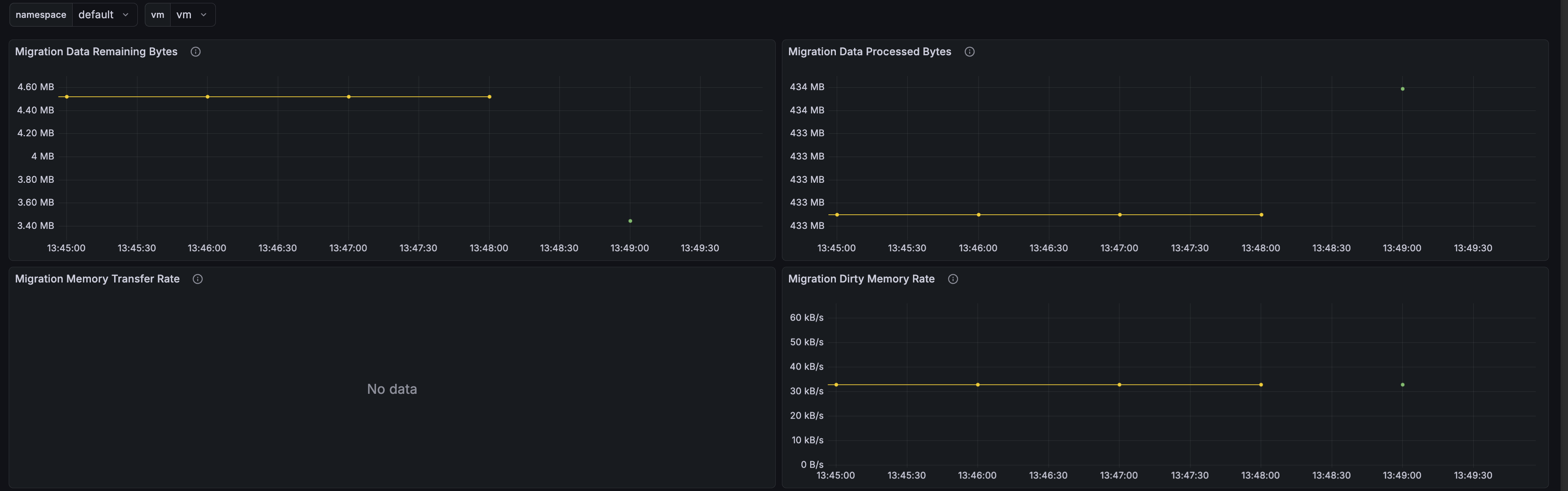
After upgrading to v1.8.x, the Migration Memory Transfer Rate panel on the Grafana dashboard for virtual machine migration does not display any data because of an outdated metric expression in the dashboard’s ConfigMap.
Workaround
Run the following commands to patch the dashboard’s ConfigMap:
inner_json=$(
  kubectl get -n cattle-dashboards configmap harvester-vm-migration-details-dashboard -o json |
    jq -r '.data."harvester_vm_migration_details.json" | fromjson |
      .panels |= map(
        if .title == "Migration Memory Transfer Rate" then
          .targets[0].expr = "kubevirt_vmi_migration_memory_transfer_rate_bytes{namespace=\"$namespace\", name=\"$vm\"}"
        else . end
      ) | tojson'
)

kubectl patch -n cattle-dashboards configmap harvester-vm-migration-details-dashboard \
  --type merge -p "{\"data\":{\"harvester_vm_migration_details.json\": $(jq -n --arg v "$inner_json" '$v')}}"
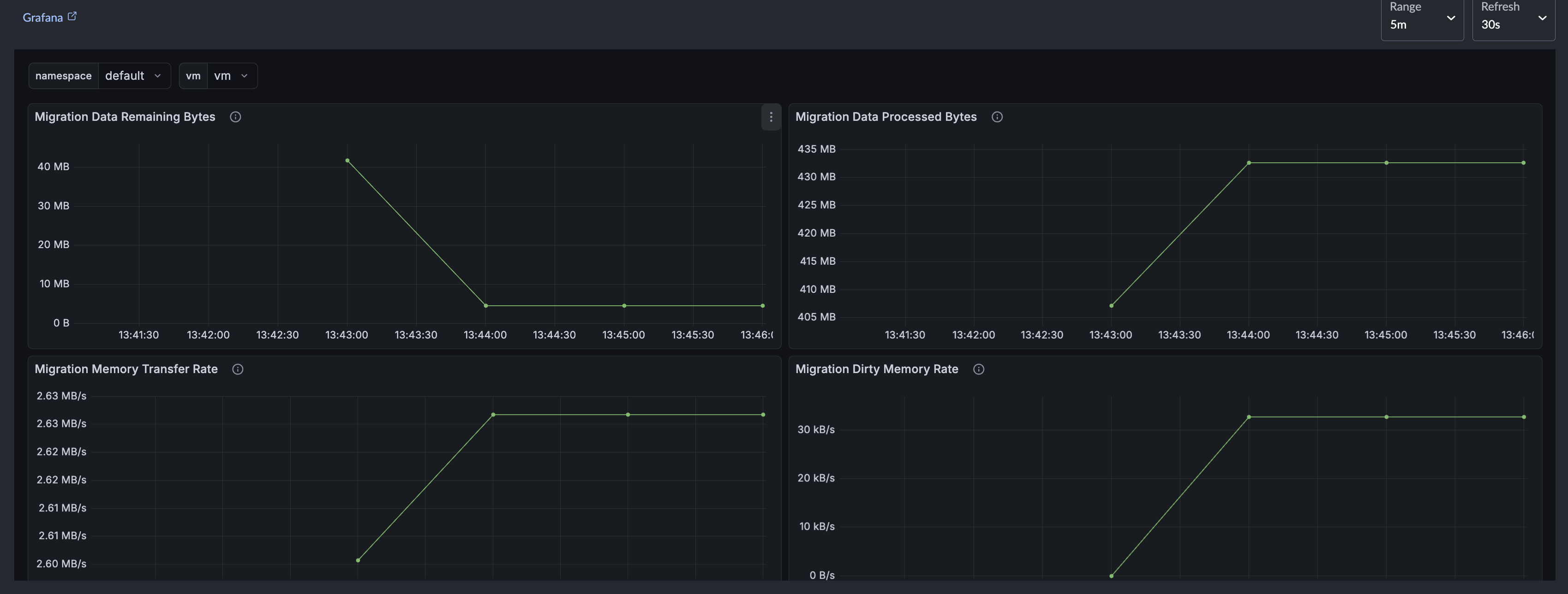
After patching, the Migration Memory Transfer Rate panel displays data during the next live migration.
Related issue: #11390
Upgrade stuck in crash loop after CDI Importer pod is OOM-killed
During Phase 1 (Provision an Upgrade Repository Virtual Machine), the Containerized Data Importer (CDI) downloads the target ISO file and converts it to a raw disk image using qemu-img convert -t writeback, which buffers converted data in memory. On slow destination storage, this buffer can grow until it exceeds the CDI importer pod’s memory limit, causing the pod to be OOM-killed.
This issue stems from the CDI configuration running on the source cluster rather than the target release. Clusters running v1.8.0 use the default importer pod memory limit of 600M, which is prone to this failure. The limit was raised to 2G in v1.8.1, but slow destination storage and large ISO images can still drive memory consumption past this threshold.
After the importer pod is OOM-killed, its /data PVC is not cleaned up automatically (unlike the /scratch PVC). The partially converted disk image remains on the volume, causing subsequent retries to miscalculate available storage space and fail immediately, leaving the pod crash-looping indefinitely.
|
This issue primarily affects upgrades from v1.8.0, which lacks the 2 GiB memory limit adjustment. SUSE Virtualization v1.8.1 and later releases include this fix, making clusters running these versions unlikely to encounter the issue. |
Symptoms
-
The
importer-prime-*pod in theharvester-systemnamespace is in aCrashLoopBackOffstate. -
Node kernel logs indicate an
oom-killevent for thevirt-cdi-importandqemu-imgprocesses, typically occurring during the initial crash:Memory cgroup out of memory: Killed process ... (virt-cdi-import) ... Memory cgroup out of memory: Killed process ... (qemu-img) ... -
Subsequent restarts do not trigger an OOM-kill. Instead, the pod fails with an error message similar to the following:
Unable to convert source data to target format: virtual image size <X> is larger than the reported available storage <Y>. A larger PVC is required
Workaround
-
This action deletes the
UpgradeCR along with its associated DataVolume and PVCs, clearing the stale/datacontent. -
Edit the
harvesterManagedChart resource.kubectl edit managedchart.management.cattle.io harvester -n fleet-local -
Increase the CDI importer pod’s memory limit beyond the default value.
Under
spec.values, configure a higher value for thecdi.spec.config.podResourceRequirements.limits.memoryfield based on available node memory. Slow storage backends and large images may require a higher allocation.If the
cdikey (or any part of its nested path) does not exist underspec.values, add the missing structure.spec: values: cdi: spec: config: podResourceRequirements: limits: memory: 4GOnly modify the
cdi.spec.config.podResourceRequirements.limits.memoryfield. Do not modify or delete any other existing fields in theharvesterManagedChart resource.The YAML snippet is an excerpt, not a full resource manifest.
-
Verify that the CDI CR reflects the change:
kubectl get cdi cdi -o jsonpath='{.spec.config.podResourceRequirements.limits.memory}{"\n"}' -
Restart the upgrade.
-
After the upgrade completes successfully, remove the
podResourceRequirementsoverride you added to theharvesterManagedChart resource in step 3.The version you upgraded to already includes the memory-limit fix, so the override is no longer needed.