生成忽略修改的 GitRepos 的差异
Rancher 中的持续交付由 SUSE® Rancher Prime Continuous Delivery 提供支持。当用户添加 GitRepo CR 时,持续交付会创建相关的 Fleet 捆绑包。
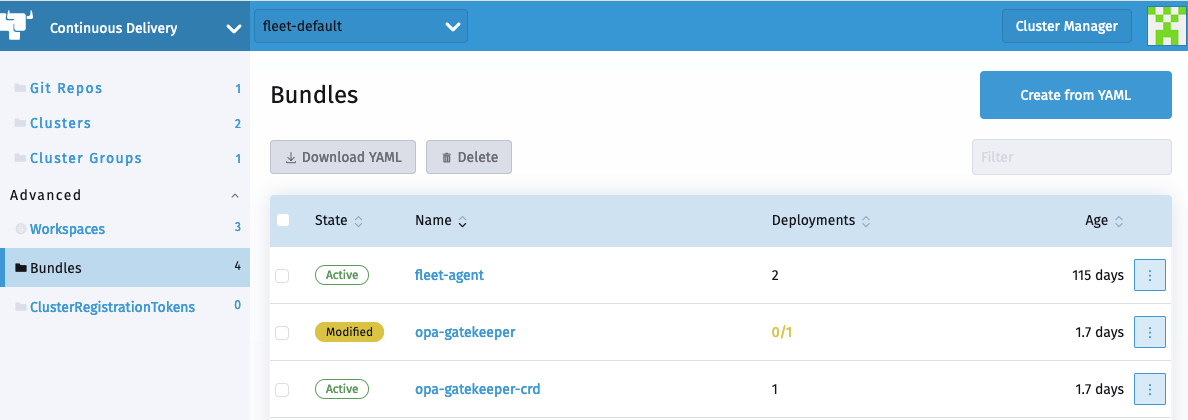
您可以通过导航到集群浏览器(仪表板 UI)并选择 Bundles 部分来访问这些捆绑包。
捆绑的图表可能有一些在运行时被修改的对象,例如在 ValidatingWebhookConfiguration 中,caBundle 是空的,CA 证书由集群注入。
这导致捆绑包和相关 GitRepo 的状态被报告为 "已修改"
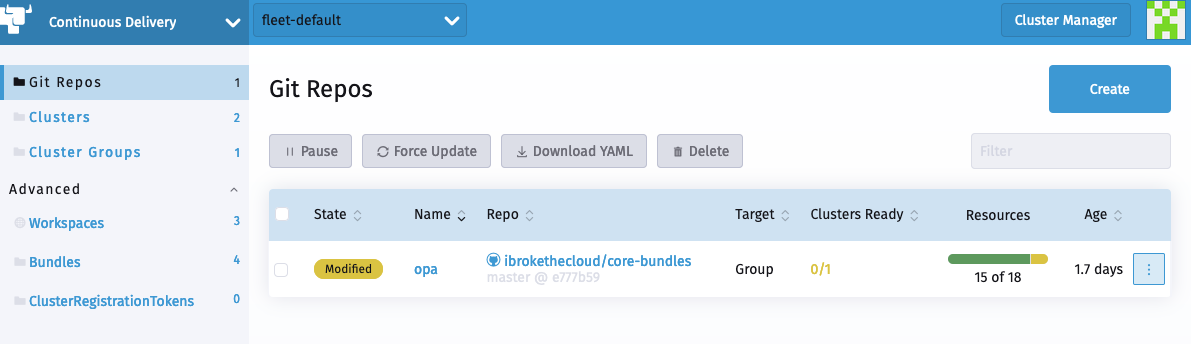
相关捆绑包
SUSE® Rancher Prime Continuous Delivery 捆绑包支持指定自定义 jsonPointer 补丁 的能力。
通过补丁,用户可以指示 SUSE® Rancher Prime Continuous Delivery 忽略对象修改和整个对象。
生成 comparePatches 与 fleet bundlediff
fleet bundlediff CLI 命令读取 Bundle 和 BundleDeployment 状态字段中已存在的差异信息,并以人类可读的形式显示。
它还可以生成一个可直接使用的 diff: 代码片段,格式为 fleet.yaml,以便您可以接受观察到的漂移,而无需手动构建 JSON Patch 路径。
查看差异
# Show all diffs across all namespaces, grouped by Bundle
fleet bundlediff

# Show diffs for a specific Bundle
fleet bundlediff --bundle my-bundle

# Show diffs for a specific BundleDeployment
fleet bundlediff --bundle-deployment my-bundle-deployment -n cluster-fleet-local-local-abc123

# Output in JSON format
fleet bundlediff --json
默认文本输出按 Bundle 分组结果,并列出每个已修改或未准备好的资源及其 JSON 合并补丁:
Bundle: my-bundle
BundleDeployments with diffs: 1
━━━━━━━━━━━━━━━━━━━━━━━━━━━━━━━━━━━━━━━━━━━━━━━━━━━━━━━━━━━━━━━━━━

  BundleDeployment: cluster-fleet-local-local-abc123/my-bundle-deployment
  Modified Resources (1):
    Resource: ConfigMap.v1 default/my-config
    Status: Modified
    Patch:
    {
      "metadata": {
        "annotations": {
          "timestamp": "2024-01-15T10:30:00Z"
        }
      }
    }
生成 fleet.yaml comparePatches 代码片段
将 --fleet-yaml 与 --bundle-deployment 一起使用,以生成一个 diff: 块,您可以直接粘贴到您的 fleet.yaml 中。该命令将观察到的 JSON 合并补丁转换为 remove 操作,并将其与 comparePatches 合并,后者已在 Bundle 上配置,因此现有的忽略保持不变。
fleet bundlediff \
  --fleet-yaml \
  --bundle-deployment my-bundle-deployment \
  -n cluster-fleet-local-local-abc123
示例输出:
diff:
  comparePatches:
  - apiVersion: v1
    kind: ConfigMap
    name: my-config
    namespace: default
    operations:
    - op: remove
      path: /metadata/annotations/timestamp
您可以重定向输出并将其附加到您的 Git 中的 fleet.yaml:
fleet bundlediff \
  --fleet-yaml \
  --bundle-deployment my-bundle-deployment \
  -n cluster-fleet-local-local-abc123 >> fleet.yaml
在您提交并推送更新的 fleet.yaml 后,SUSE® Rancher Prime Continuous Delivery 会协调更改,捆绑包从 已修改 过渡到 已准备好。该字段本身不会被还原。SUSE® Rancher Prime Continuous Delivery
只是停止将其报告为漂移。
|
|
请参见 fleet bundlediff [SUSE® Rancher Prime Continuous Delivery bundlediff] 以获取完整的标志参考。
忽略对象修改
Gatekeeper 示例
在这个示例中,我们尝试使用持续交付将 opa-gatekeeper 部署到我们的集群中。
与 opa GitRepo 关联的 opa-gatekeeper 捆绑包处于修改状态。
GitRepo CR 中的每个路径都有一个关联的 Bundle CR。用户可以查看 Bundles 及其在 Bundle 状态中所需的关联差异。
在我们的案例中,检测到的差异如下:
  summary:
    desiredReady: 1
    modified: 1
    nonReadyResources:
    - bundleState: Modified
      modifiedStatus:
      - apiVersion: admissionregistration.k8s.io/v1
        kind: ValidatingWebhookConfiguration
        name: gatekeeper-validating-webhook-configuration
        patch: '{"$setElementOrder/webhooks":[{"name":"validation.gatekeeper.sh"},{"name":"check-ignore-label.gatekeeper.sh"}],"webhooks":[{"clientConfig":{"caBundle":"Cg=="},"name":"validation.gatekeeper.sh","rules":[{"apiGroups":["*"],"apiVersions":["*"],"operations":["CREATE","UPDATE"],"resources":["*"]}]},{"clientConfig":{"caBundle":"Cg=="},"name":"check-ignore-label.gatekeeper.sh","rules":[{"apiGroups":[""],"apiVersions":["*"],"operations":["CREATE","UPDATE"],"resources":["namespaces"]}]}]}'
      - apiVersion: apps/v1
        kind: Deployment
        name: gatekeeper-audit
        namespace: cattle-gatekeeper-system
        patch: '{"spec":{"template":{"spec":{"$setElementOrder/containers":[{"name":"manager"}],"containers":[{"name":"manager","resources":{"limits":{"cpu":"1000m"}}}],"tolerations":[]}}}}'
      - apiVersion: apps/v1
        kind: Deployment
        name: gatekeeper-controller-manager
        namespace: cattle-gatekeeper-system
        patch: '{"spec":{"template":{"spec":{"$setElementOrder/containers":[{"name":"manager"}],"containers":[{"name":"manager","resources":{"limits":{"cpu":"1000m"}}}],"tolerations":[]}}}}'
根据此摘要,有三个对象需要打补丁。
我们将逐一查看这些。
1.ValidatingWebhookConfiguration:
gatekeeper-validating-webhook-configuration 验证 webhook 在其规格中有两个 ValidatingWebhooks。
在字段中如果有多个元素需要打补丁,则该补丁会将它们统称为 $setElementOrder/ELEMENTNAME。
从这些信息中,我们可以看到相关的两个 ValidatingWebhooks 是:
  "$setElementOrder/webhooks": [
    {
      "name": "validation.gatekeeper.sh"
    },
    {
      "name": "check-ignore-label.gatekeeper.sh"
    }
  ],
在每个 ValidatingWebhook 中,需要忽略的字段如下:
    {
      "clientConfig": {
        "caBundle": "Cg=="
      },
      "name": "validation.gatekeeper.sh",
      "rules": [
        {
          "apiGroups": [
            "*"
          ],
          "apiVersions": [
            "*"
          ],
          "operations": [
            "CREATE",
            "UPDATE"
          ],
          "resources": [
            "*"
          ]
        }
      ]
    },
和
     {
      "clientConfig": {
        "caBundle": "Cg=="
      },
      "name": "check-ignore-label.gatekeeper.sh",
      "rules": [
        {
          "apiGroups": [
            ""
          ],
          "apiVersions": [
            "*"
          ],
          "operations": [
            "CREATE",
            "UPDATE"
          ],
          "resources": [
            "namespaces"
          ]
        }
      ]
    }
总之,我们需要在我们的补丁规范中忽略字段 rules 和 clientConfig.caBundle。
ValidatingWebhookConfiguration 规范中的字段 webhook 是一个数组,因此我们需要通过索引值来访问元素。
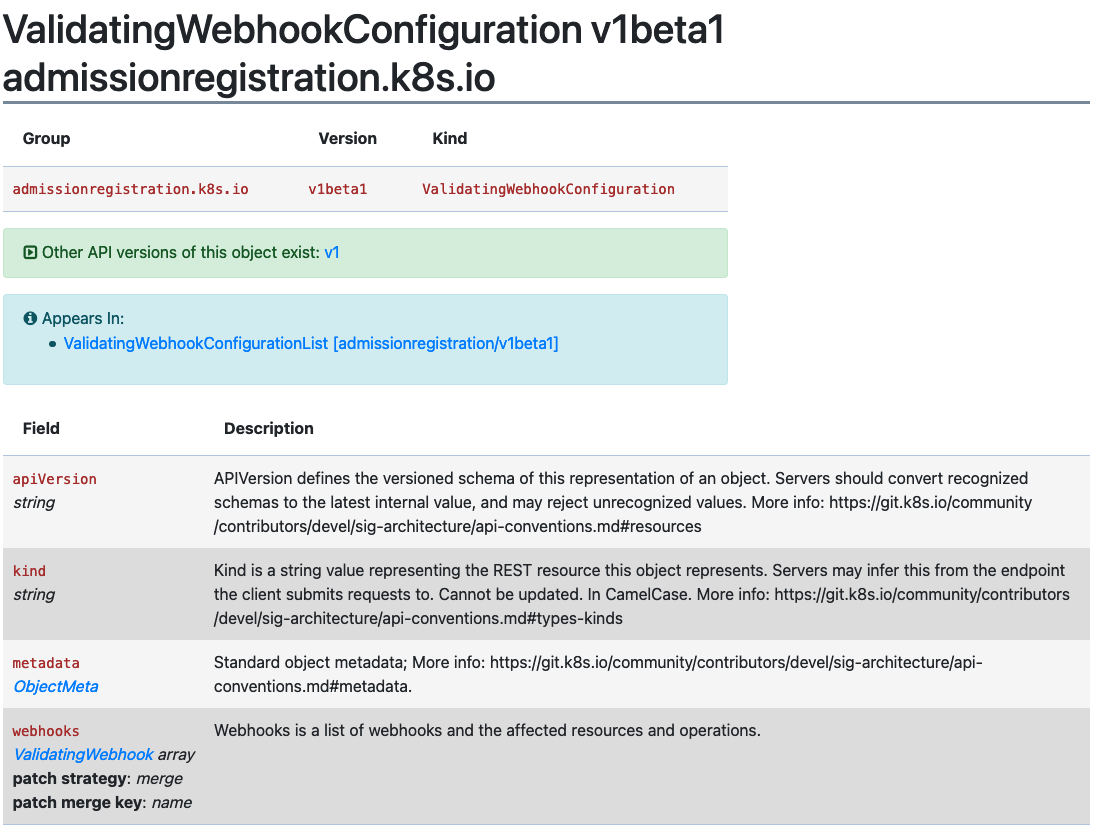
根据这些信息,我们的差异补丁如下所示:
  - apiVersion: admissionregistration.k8s.io/v1
    kind: ValidatingWebhookConfiguration
    name: gatekeeper-validating-webhook-configuration
    operations:
    - {"op": "remove", "path":"/webhooks/0/clientConfig/caBundle"}
    - {"op": "remove", "path":"/webhooks/0/rules"}
    - {"op": "remove", "path":"/webhooks/1/clientConfig/caBundle"}
    - {"op": "remove", "path":"/webhooks/1/rules"}
2.部署 gatekeeper-controller-manager:
由于应用了处理器限制和容忍度(这些在实际包中不存在),gatekeeper-controller-manager 部署已被修改。
{
  "spec": {
    "template": {
      "spec": {
        "$setElementOrder/containers": [
          {
            "name": "manager"
          }
        ],
        "containers": [
          {
            "name": "manager",
            "resources": {
              "limits": {
                "cpu": "1000m"
              }
            }
          }
        ],
        "tolerations": []
      }
    }
  }
}
在这种情况下,部署容器规范中只有 1 个容器,并且该容器添加了处理器限制和容忍度。
根据这些信息,我们的差异补丁如下所示:
  - apiVersion: apps/v1
    kind: Deployment
    name: gatekeeper-controller-manager
    namespace: cattle-gatekeeper-system
    operations:
    - {"op": "remove", "path": "/spec/template/spec/containers/0/resources/limits/cpu"}
    - {"op": "remove", "path": "/spec/template/spec/tolerations"}
3.部署 gatekeeper-audit:
gatekeeper-audit 部署的修改方式与 gatekeeper-controller-manager 类似,应用了额外的处理器限制和容忍度。
{
  "spec": {
    "template": {
      "spec": {
        "$setElementOrder/containers": [
          {
            "name": "manager"
          }
        ],
        "containers": [
          {
            "name": "manager",
            "resources": {
              "limits": {
                "cpu": "1000m"
              }
            }
          }
        ],
        "tolerations": []
      }
    }
  }
}
与 gatekeeper-controller-manager 类似,部署的容器规范中只有 1 个容器,并且该容器添加了处理器限制和容忍度。
根据这些信息,我们的差异补丁如下所示:
  - apiVersion: apps/v1
    kind: Deployment
    name: gatekeeper-audit
    namespace: cattle-gatekeeper-system
    operations:
    - {"op": "remove", "path": "/spec/template/spec/containers/0/resources/limits/cpu"}
    - {"op": "remove", "path": "/spec/template/spec/tolerations"}
将所有内容整合在一起
我们现在可以将所有这些补丁合并如下:
diff:
  comparePatches:
  - apiVersion: apps/v1
    kind: Deployment
    name: gatekeeper-audit
    namespace: cattle-gatekeeper-system
    operations:
    - {"op": "remove", "path": "/spec/template/spec/containers/0/resources/limits/cpu"}
    - {"op": "remove", "path": "/spec/template/spec/tolerations"}
  - apiVersion: apps/v1
    kind: Deployment
    name: gatekeeper-controller-manager
    namespace: cattle-gatekeeper-system
    operations:
    - {"op": "remove", "path": "/spec/template/spec/containers/0/resources/limits/cpu"}
    - {"op": "remove", "path": "/spec/template/spec/tolerations"}
  - apiVersion: admissionregistration.k8s.io/v1
    kind: ValidatingWebhookConfiguration
    name: gatekeeper-validating-webhook-configuration
    operations:
    - {"op": "remove", "path":"/webhooks/0/clientConfig/caBundle"}
    - {"op": "remove", "path":"/webhooks/0/rules"}
    - {"op": "remove", "path":"/webhooks/1/clientConfig/caBundle"}
    - {"op": "remove", "path":"/webhooks/1/rules"}
我们现在可以将这些直接添加到包中进行测试,并将其提交到您的 GitRepo 中的 fleet.yaml。
一旦添加,这个 GitRepo 应该会部署并处于 "活动" 状态。
忽略整个对象
当安装一个图表,例如 Consul 时,会创建一个名为 consul-server-acl-init 的作业,然后在成功完成后删除。
可以通过创建一个指向 git 仓库的 GitRepo 来安装该图表,使用如下的 fleet.yaml:
defaultNamespace: consul
helm:
  releaseName: test-consul
  chart: "consul"
  repo: "https://helm.releases.hashicorp.com"

  values:
    global:
      name: consul
      acls:
        manageSystemACLs: true
安装此图表将导致 GitRepo 报告 Modified 状态,一旦该作业完成,作业 consul-server-acl-init 将缺失。
可以通过我们 fleet.yaml 中的以下包差异来解决此问题:
diff:
  comparePatches:
  - apiVersion: batch/v1
    kind: Job
    namespace: consul
    name: consul-server-acl-init
    operations:
    - {"op":"ignore"}
在某些情况下,作业的全名可能无法提前知道,例如当它被生成时。 此外,给定的工作负载可能会在同一名称空间中创建多个作业,这通常会导致每个作业一个包差异。
为了更容易处理这些情况,作业也可以被忽略:
-
通过对它们的名称进行正则表达式匹配,在这种情况下,上述差异可能看起来像:
diff:
  comparePatches:
  - apiVersion: batch/v1
    kind: Job
    namespace: consul
    name: 'consul-server.*'
    operations:
    - {"op":"ignore"}
-
或者通过指定一个空的`name`字段,或者完全省略该字段,在这种情况下,所有在该名称空间中(在此示例中为`consul`名称空间)存在的作业将被忽略。
有关支持的正则表达式语法的更多信息在这里。