rke2-patcher
rke2-patcher is a CLI tool for SUSE Rancher Prime: RKE2 that helps operators inspect and patch packaged component images.
The primary use case for rke2-patcher is to consume component images that include serious CVE fixes before the next monthly RKE2 release is available. The built-in patching limitations are intentional and are designed to encourage timely RKE2 upgrades, rather than carrying rke2-patcher overrides indefinitely on the same RKE2 version.
|
|
The tool can be used to inspect the images that are currently running in an RKE2 cluster, review newer tags that are available for supported packaged components, patch a component to a newer eligible image, and reconcile those changes after an RKE2 upgrade.
Supported components
-
rke2-traefik -
rke2-ingress-nginx -
rke2-coredns -
rke2-dns-node-cache -
rke2-metrics-server -
rke2-flannel -
rke2-canal-calico -
rke2-canal-flannel -
rke2-coredns-cluster-autoscaler -
rke2-snapshot-controller
Installation
You can use rke2-patcher either as a locally built CLI binary or as a pod running inside the cluster.
If you are using RKE2 Prime, you can also download the rke2-patcher binary from the Prime Artifacts URL.
Deploy with the Helm chart
The project also includes a Helm chart that deploys rke2-patcher into the cluster.
helm upgrade --install rke2-patcher ./charts/rke2-patcher \
	--namespace rke2-patcher \
	--create-namespace
The chart deploys rke2-patcher as a control-plane workload and allows the image repository and tag to be customized through Helm values.
rke2-patcher CLI
rke2-patcher --version
rke2-patcher --config
rke2-patcher image-cve <component>
rke2-patcher image-list <component> [--with-cves] [--verbose]
rke2-patcher image-patch <component> [--dry-run] [--yes|-y]
rke2-patcher image-reconcile <component> [--yes|-y]
rke2-patcher --version
Print the rke2-patcher version. When Kubernetes access is available, this command also reports the connected cluster version.
rke2-patcher --versionrke2-patcher --config
Show the effective runtime configuration used by rke2-patcher, including the configured registry, scanner mode, scanner image, scanner namespace, scanner timeout, and patch state ConfigMap.
rke2-patcher --configThis command is useful to verify environment variables before scanning or patching.
rke2-patcher image-cve <component>
Show the CVEs for the image currently running for the selected component.
By default, image-cve starts an in-cluster scanner Job that runs Trivy. When RKE2_PATCHER_CVE_MODE=local is set, the command uses a local scanner instead.
Use this command when you want to inspect the current risk profile of a deployed component image before deciding whether to patch.

rke2-patcher image-list <component>
List the image tags available for a supported component.
The image-list command can optionally scan selected tags for CVEs:
-
--with-cves: scan the current, previous, and eligible newer tags -
--verbose: show the full CVE list for each scanned tag
Use this command to compare the currently running tag with newer eligible tags before applying a patch.

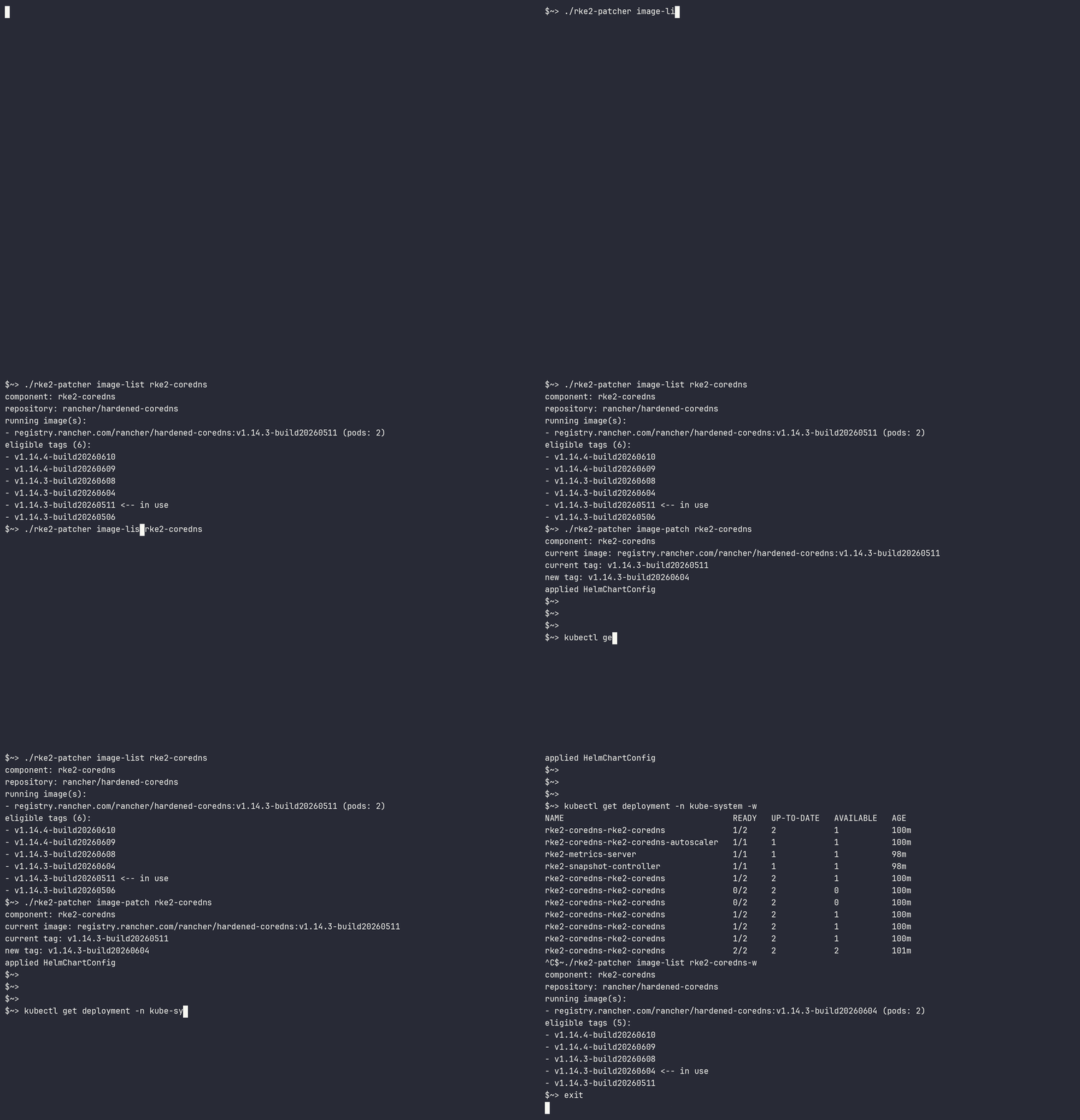
rke2-patcher image-patch <component>
Patch a supported component to the next eligible image tag.
The command creates or updates a HelmChartConfig in the cluster and records patch state so the change can be reconciled later.
image-patch supports the following options:
-
--dry-run: print the generatedHelmChartConfigwithout applying it -
--yesor-y: automatically approve prompts
The command enforces the patch window rules for the target component. If a target image falls outside the allowed window, rke2-patcher instructs you to upgrade RKE2 first.
rke2-patcher image-reconcile <component>
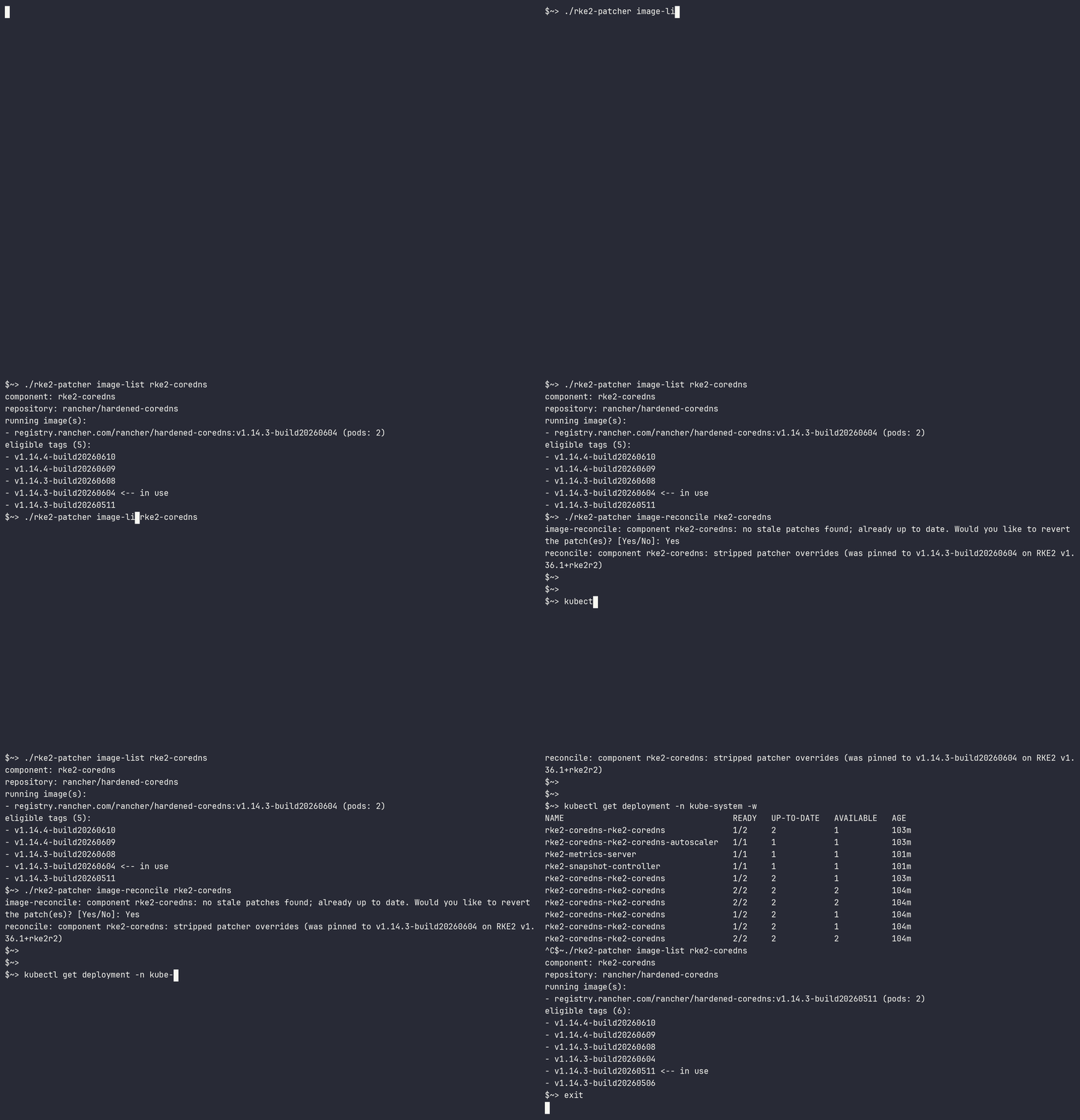
Reconcile or revert a previously applied patch for a supported component.
This command is typically used after an RKE2 upgrade, when an older patch state must be cleared before patching can be used again.
image-reconcile supports the following option:
-
--yesor-y: automatically approve prompts
When reconciliation succeeds, rke2-patcher removes the patcher-managed image override values and lets RKE2 return to the packaged chart defaults.
Limitations
-
rke2-patchersupports Prime clusters only and requiresprime: truein the RKE2 configuration. -
Patching is limited to the supported component list shown on this page.
-
For most components,
image-patchenforces a 45-day patch window from the cluster zero-day. Tags outside that window are blocked until you upgrade RKE2. -
rke2-ingress-nginxis exempt from the 45-day patch window check. -
If stale patch state exists from a previous RKE2 version, new patch operations are blocked until you run
image-reconcile. -
After an RKE2 upgrade, all previously patched components must be reconciled before applying new patches.
-
Patching and reconciliation require Kubernetes API access and permissions to update
HelmChartConfigresources.
Typical workflow
-
Check current status and available tags.
-
Patch one or more supported components.
-
Upgrade RKE2 when needed.
-
Run
image-reconcilefor previously patched components.
Requirements
-
Kubernetes API access (in-cluster service account or kubeconfig).
-
Access to the configured image registry endpoint.
-
Permissions to create scanner Jobs and read logs for CVE scans.
-
Permissions to create or update
HelmChartConfigobjects for patch and reconcile operations.
For complete behavior and command details, refer to the upstream project documentation: https://github.com/rancher/rke2-patcher.