This is unreleased documentation for SUSE® Rancher Manager v2.15 (Unreleased).

Installing Project Monitors

Deprecation Notice

Rancher Monitoring v2 (rancher-monitoring) is deprecated and no longer receives updates. Rancher maintains the legacy chart only to support existing deployments. For new installations, ongoing updates, and support, use the decoupled rancher-monitoring-dashboards chart. For instructions on migrating, see Migrating from rancher-monitoring to rancher-monitoring-dashboards.

Install Project Monitors in each project where you want to enable project monitoring.

  1. Click ☰ > Cluster Management.

  2. On the Clusters page, go to the cluster where you want to enable monitoring and click Explore.

  3. Click Monitoring  Project Monitors on the left nav bar. Then click Create in the upper right.
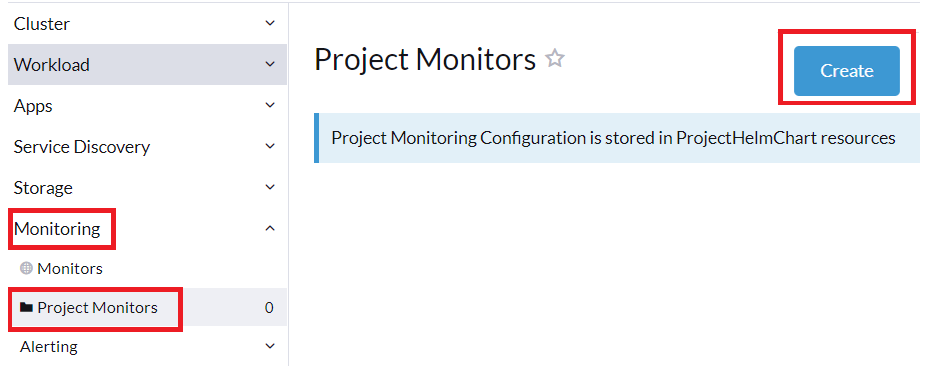
    Project Monitors
  4. Select your project from the drop-down menu, then click Create again.
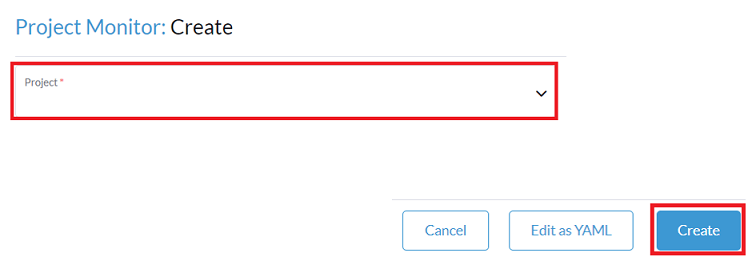
    Create Project Monitors